> ## Documentation Index
> Fetch the complete documentation index at: https://guides.koinx.com/llms.txt
> Use this file to discover all available pages before exploring further.
# Getting Started with Integrations
> Learn which exchanges, wallets and blockchains to connect in KoinX so your crypto tax reports include every trade, transfer, reward and balance across your activity.
Your tax report is only as good as the data behind it. If KoinX doesn't know about an exchange you traded on or a wallet you used, those transactions won't appear in your report — and that's how you end up with incorrect tax numbers or, worse, missing disclosures. This guide helps you figure out exactly what to connect.
* Connect **every** exchange and wallet where you've ever bought, sold, received, or held crypto — even if you no longer use it
* **Incomplete integrations** are the **#1 cause of wrong tax reports** in KoinX
* Yes, add offshore/foreign exchanges, DeFi wallets, and exchanges where TDS wasn't deducted
* KoinX supports 800+ integrations - exchanges, wallets, blockchains, and custom file uploads
***
## Why Integrations Matter
KoinX calculates your taxes based on the transactions it can see. Every exchange or wallet you skip is a gap in your data — and gaps create real problems like:
**Zero cost basis** — this happens when KoinX has a sell transaction but no record of the original purchase. The most common cause: you bought a coin in one financial year and only added data starting from a later year. KoinX doesn't know what you paid, so it treats the cost as ₹0 — which means your entire sale proceeds count as taxable gains. To get accurate numbers, you need to add data for every financial year you've held or traded crypto, not just the current one.
**Incorrect cost basis on transfers** — moving crypto between your own wallets is not a taxable event. But if you only add one of the two wallets, KoinX can't carry the original purchase price forward. It ends up using the market price at the time of deposit as the cost basis — which is likely wrong. Add both the sending and receiving wallet so KoinX can trace the cost basis correctly from the original purchase all the way through to the eventual sale.
**Missing income** — airdrops, staking rewards, and interest earned on platforms you haven't connected simply won't appear in your tax report.
The bottom line: the more complete your integrations, the more accurate your report.
***
## What Should I Connect?
### Exchanges you actively trade on
This one's obvious. Binance, Coinbase, Kraken, WazirX, CoinDCX — whatever you use. Connect them all. Using an international exchange doesn't exempt those transactions from taxes. Most jurisdictions require you to disclose all crypto activity regardless of where the exchange is based. Connect them.
### Exchanges you no longer use
Even if you haven't touched an exchange in two years, if you ever bought crypto there that you later sold elsewhere, KoinX needs that acquisition history. Without it, your cost basis is missing.
### Blockchain / DeFi wallets
MetaMask, Phantom, Trust Wallet, Ledger — if you've interacted with DeFi protocols, staked tokens, or received airdrops through a wallet, it needs to be in KoinX. Paste your public wallet address and KoinX scans the blockchain directly.
Deliberately not disclosing exchanges or wallets doesn't reduce your tax obligation — it creates compliance risk. Tax authorities can cross-check blockchain data, bank transfers, and exchange KYC records. It's always better to have complete data in your report.
For Indian Users:
### Also add exchanges where TDS wasn't deducted
In some jurisdictions (like India), certain exchanges deduct TDS at source while others don't. Either way, the transactions are taxable. Not having TDS deducted doesn't mean the trade is tax-free — it just means you need to account for it yourself.
***
## How to Add Your First Integration
You'll see a search bar and category tabs: All Integrations, Partners, Popular, Exchanges, Wallets, Blockchains, and Decentralized Exchanges.
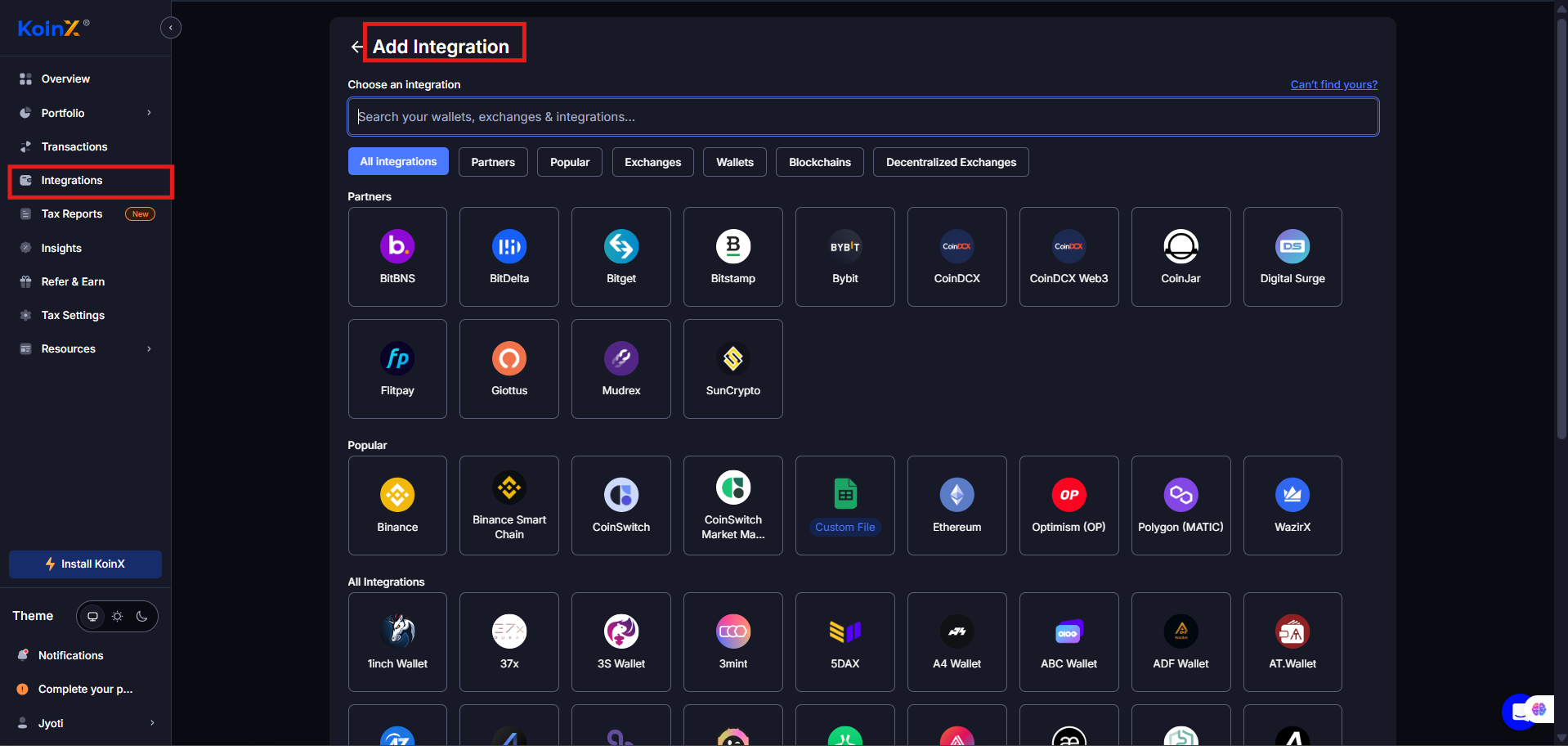 Depending on the exchange, KoinX will offer API, File Upload, Blockchain Address, or Custom File. You need to follow the on-screen setup.
Each method has its own steps, and KoinX shows built-in instructions on the right side of the page.
### **Not sure which exchanges you've used?**
Check your email for signup confirmations, look at your bank statements for fiat deposits to exchanges, and review your browser bookmarks.
In some cases - The **Potential Accounts** feature under **Actions** on the Transactions page can also help identify wallets you may have missed based on your on-chain activity.
***
## How Many Integrations Should I Have?
As many as you need. There's no practical limit on the number of integrations you can add to KoinX. If you've used 2 exchanges and 1 wallet, add 3 integrations. If you've used 12 exchanges, 5 wallets, and 3 blockchains — add all 20.
The goal is a complete picture of your crypto activity. Every source you skip is a potential gap in your tax report.
***
## Common Issues / Edge Cases
Yes. Even 5 transactions need to be accurately reported. And KoinX needs the full context — including acquisitions — to calculate your cost basis correctly.
Yes. Staking rewards are typically treated as income in most jurisdictions. KoinX needs to see them to include them in your tax report.
Yes. Crypto received as salary is taxable income. Connect the exchange so KoinX captures those deposits and categorises them correctly.
Use the **Custom File** integration. Download your transaction history from the exchange, format it using KoinX's template, and upload.
***
## Frequently Asked Questions
There's no practical limit. Add every exchange, wallet, and blockchain where you've had crypto activity. The more complete your integrations, the more accurate your tax report.
No. Tax authorities in most jurisdictions require disclosure of all crypto activity. Blockchain transactions are publicly traceable, and exchanges share KYC data with regulators in many countries. Incomplete disclosure creates audit risk. Always add all your sources.
Try recovering your account through the exchange's support. If the exchange has shut down, check your email for trade confirmations and use the **Custom File** or **Manual Add Transaction** options to add those historical trades. Even approximate records are better than gaps.
No. Testnet and paper trading don't involve real assets and have no tax implications. Only connect accounts where real crypto was bought, sold, transferred, or received.
***
[Next: verify your integration data before generating a report](/guides/integrations/verifying-your-integration-data)
Depending on the exchange, KoinX will offer API, File Upload, Blockchain Address, or Custom File. You need to follow the on-screen setup.
Each method has its own steps, and KoinX shows built-in instructions on the right side of the page.
### **Not sure which exchanges you've used?**
Check your email for signup confirmations, look at your bank statements for fiat deposits to exchanges, and review your browser bookmarks.
In some cases - The **Potential Accounts** feature under **Actions** on the Transactions page can also help identify wallets you may have missed based on your on-chain activity.
***
## How Many Integrations Should I Have?
As many as you need. There's no practical limit on the number of integrations you can add to KoinX. If you've used 2 exchanges and 1 wallet, add 3 integrations. If you've used 12 exchanges, 5 wallets, and 3 blockchains — add all 20.
The goal is a complete picture of your crypto activity. Every source you skip is a potential gap in your tax report.
***
## Common Issues / Edge Cases
Yes. Even 5 transactions need to be accurately reported. And KoinX needs the full context — including acquisitions — to calculate your cost basis correctly.
Yes. Staking rewards are typically treated as income in most jurisdictions. KoinX needs to see them to include them in your tax report.
Yes. Crypto received as salary is taxable income. Connect the exchange so KoinX captures those deposits and categorises them correctly.
Use the **Custom File** integration. Download your transaction history from the exchange, format it using KoinX's template, and upload.
***
## Frequently Asked Questions
There's no practical limit. Add every exchange, wallet, and blockchain where you've had crypto activity. The more complete your integrations, the more accurate your tax report.
No. Tax authorities in most jurisdictions require disclosure of all crypto activity. Blockchain transactions are publicly traceable, and exchanges share KYC data with regulators in many countries. Incomplete disclosure creates audit risk. Always add all your sources.
Try recovering your account through the exchange's support. If the exchange has shut down, check your email for trade confirmations and use the **Custom File** or **Manual Add Transaction** options to add those historical trades. Even approximate records are better than gaps.
No. Testnet and paper trading don't involve real assets and have no tax implications. Only connect accounts where real crypto was bought, sold, transferred, or received.
***
[Next: verify your integration data before generating a report](/guides/integrations/verifying-your-integration-data)