> ## Documentation Index
> Fetch the complete documentation index at: https://guides.koinx.com/llms.txt
> Use this file to discover all available pages before exploring further.
# Buy-Sell Report
> Review every buy, sell and swap in one place with the Buy-Sell Report so you can verify trading activity and spot issues before generating final crypto tax reports.
* This report shows all buy and sell transactions during the selected financial year
* Includes crypto purchases, crypto sales, and crypto-to-crypto swaps
* Does not include deposits, withdrawals, transfers, or income events
* Useful for reviewing trading activity and verifying imported trade data before generating tax reports
* Available to all users regardless of country setting
The Buy-Sell Report shows every purchase and sale of crypto assets recorded in your account during the selected financial year. If you want to review your trading activity without the noise of transfers, deposits, staking rewards, or other income events, this report gives you a clean list of your buy and sell transactions.
***
## What Does This Report Contain?
| Included | Not Included |
| ------------------------------- | ------------------ |
| Crypto buy transactions | Deposits |
| Crypto sell transactions | Withdrawals |
| Crypto-to-crypto swaps | Internal transfers |
| Fiat-to-crypto purchases | Staking rewards |
| Crypto-to-fiat sales | Airdrops |
| Trading activity from exchanges | Income events |
***
## Understanding Each Column
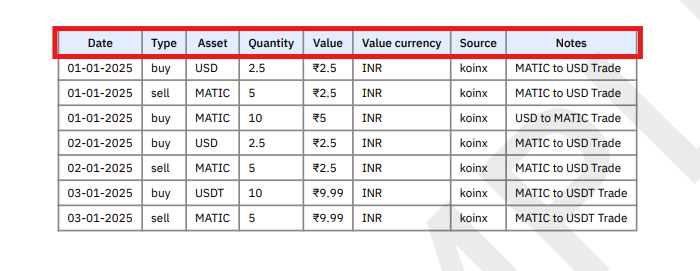 | Column | What It Shows |
| -------------- | ------------------------------------------------- |
| Date | Date when the transaction occurred |
| Type | Buy or Sell |
| Asset | Cryptocurrency involved |
| Quantity | Amount of the asset bought or sold |
| Value | Value of the transaction |
| Value Currency | Currency used for valuation (e.g. INR) |
| Source | Exchange or wallet where the transaction occurred |
| Notes | Additional context (e.g. swap details) |
***
## How Crypto Swaps Appear in the Report
Crypto-to-crypto swaps are recorded as two separate transactions in the Buy-Sell Report.
| Column | What It Shows |
| -------------- | ------------------------------------------------- |
| Date | Date when the transaction occurred |
| Type | Buy or Sell |
| Asset | Cryptocurrency involved |
| Quantity | Amount of the asset bought or sold |
| Value | Value of the transaction |
| Value Currency | Currency used for valuation (e.g. INR) |
| Source | Exchange or wallet where the transaction occurred |
| Notes | Additional context (e.g. swap details) |
***
## How Crypto Swaps Appear in the Report
Crypto-to-crypto swaps are recorded as two separate transactions in the Buy-Sell Report.
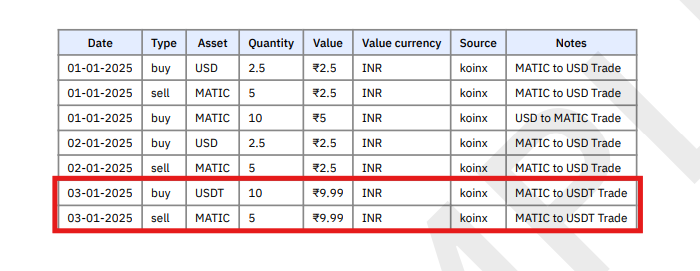 **Example:** If you swap MATIC for USDT, the report shows:
1. Sell MATIC
2. Buy USDT
This ensures both sides of the trade are clearly recorded.
***
## Buy-Sell Report vs Transaction History Report
| Feature | Buy-Sell Report | Transaction History Report |
| --------------------------- | -------------------------- | ---------------------------- |
| Shows buy/sell trades | Yes | Yes |
| Shows deposits/withdrawals | No | Yes |
| Shows transfers | No | Yes |
| Shows staking/airdrops | No | Yes |
| Shows only trading activity | Yes | No |
| Best for | Reviewing trading activity | Complete transaction history |
Use the Buy-Sell Report when you want to focus only on trades, without other transaction types getting in the way.
***
## Using This Report for Verification
Before generating your tax reports, use the Buy-Sell Report to:
1. Review trading activity during the financial year
2. Check whether all exchanges and wallets are included
3. Verify large or unusual trades look correct
4. Confirm that data imported from integrations or CSV files is accurate
This helps ensure your trading data is complete before tax calculations are generated.
***
## Filtering the Report
The PDF version cannot be filtered directly. To sort or filter by date, asset, or source:
1. Download the report in **Excel format**
2. Use spreadsheet filters to find specific trades
3. Alternatively, use the Transactions page in KoinX to filter before generating the report
***
## Frequently Asked Questions
No. The Buy-Sell Report only includes transactions related to trading activity: buys, sells, and swaps. For a complete record including deposits and withdrawals, use the Transaction History Report.
Crypto-to-crypto trades are recorded as two entries: one sell transaction and one buy transaction. This ensures both sides of the trade are properly captured for cost basis and gain/loss calculations.
Yes. All connected exchanges, wallets, and uploaded files that contain buy and sell transactions appear in this report, consolidated into a single list.
This report shows your trading records, not the final tax calculations. Tax calculations appear in the Complete Tax Report and Capital Gains summaries. Use the Buy-Sell Report for reviewing and verifying your trade data.
The PDF version cannot be filtered, but you can download the Excel version and sort or filter by asset, date, or exchange using standard spreadsheet tools.
***
**Example:** If you swap MATIC for USDT, the report shows:
1. Sell MATIC
2. Buy USDT
This ensures both sides of the trade are clearly recorded.
***
## Buy-Sell Report vs Transaction History Report
| Feature | Buy-Sell Report | Transaction History Report |
| --------------------------- | -------------------------- | ---------------------------- |
| Shows buy/sell trades | Yes | Yes |
| Shows deposits/withdrawals | No | Yes |
| Shows transfers | No | Yes |
| Shows staking/airdrops | No | Yes |
| Shows only trading activity | Yes | No |
| Best for | Reviewing trading activity | Complete transaction history |
Use the Buy-Sell Report when you want to focus only on trades, without other transaction types getting in the way.
***
## Using This Report for Verification
Before generating your tax reports, use the Buy-Sell Report to:
1. Review trading activity during the financial year
2. Check whether all exchanges and wallets are included
3. Verify large or unusual trades look correct
4. Confirm that data imported from integrations or CSV files is accurate
This helps ensure your trading data is complete before tax calculations are generated.
***
## Filtering the Report
The PDF version cannot be filtered directly. To sort or filter by date, asset, or source:
1. Download the report in **Excel format**
2. Use spreadsheet filters to find specific trades
3. Alternatively, use the Transactions page in KoinX to filter before generating the report
***
## Frequently Asked Questions
No. The Buy-Sell Report only includes transactions related to trading activity: buys, sells, and swaps. For a complete record including deposits and withdrawals, use the Transaction History Report.
Crypto-to-crypto trades are recorded as two entries: one sell transaction and one buy transaction. This ensures both sides of the trade are properly captured for cost basis and gain/loss calculations.
Yes. All connected exchanges, wallets, and uploaded files that contain buy and sell transactions appear in this report, consolidated into a single list.
This report shows your trading records, not the final tax calculations. Tax calculations appear in the Complete Tax Report and Capital Gains summaries. Use the Buy-Sell Report for reviewing and verifying your trade data.
The PDF version cannot be filtered, but you can download the Excel version and sort or filter by asset, date, or exchange using standard spreadsheet tools.
***