> ## Documentation Index
> Fetch the complete documentation index at: https://guides.koinx.com/llms.txt
> Use this file to discover all available pages before exploring further.
# Payments & Plan Upgrade
> Understand how KoinX pricing and plan upgrades work for crypto tax reports, including transaction-based tiers, regeneration, and access across financial years.
* One plan upgrade unlocks all reports for that financial year, no extra charge per report
* You can edit transactions and regenerate reports unlimited times after upgrading, at no additional cost
* Each financial year requires a separate plan purchase
* You can see your tax breakdown in percentages before upgrading, but exact taxable amounts are locked until you pay
* Reports remain accessible permanently after purchase
* Payment methods include UPI, cards, net banking, and international options
One upgrade, all reports, unlimited regenerations. Here is everything you need to know about how payments work.
***
## What Does Upgrading My Plan Unlock?
When you upgrade your KoinX plan for a financial year, you get:
| What You Get | Details |
| ---------------------- | --------------------------------------------------------------------------------------------------------------------------------------------------------------- |
| All tax reports | Every universal and country-specific report: Complete Tax Report, Schedule VDA, Form 8949, Income Summary, Transaction History, Tax Filing Data, and all others |
| Unlimited downloads | Download each report as many times as you want |
| Unlimited regeneration | Edit your transactions, fix errors, and regenerate fresh reports at no extra charge |
| Permanent access | Reports stay in Previously Generated Reports indefinitely |
You are not paying per report. You are paying for access to all reports for that financial year. Generate one report or generate ten , same price.
***
## How Pricing Works
KoinX plans are based on **transaction volume**. The more transactions you have in a financial year, the higher the plan tier.
If your transaction count exceeds your current plan's limit after you have already purchased:
* KoinX shows you the difference amount needed to upgrade
* You pay only the **difference**, not the full price of the higher tier
* Once paid, you are on the higher tier for that financial year
Transaction count is calculated across all your integrations for the selected financial year. This includes trades, deposits, withdrawals, transfers, staking rewards, and everything else recorded in your account.
***
## Do I Pay Separately for Each Financial Year?
Yes. Tax reports are financial year-specific. FY 2024-25 and FY 2025-26 require separate plan purchases. Each year's plan gives you unlimited access to all reports for that year.
***
## Can I See My Tax Summary Before Paying?
Yes, partially.
**Before upgrading you can see:**
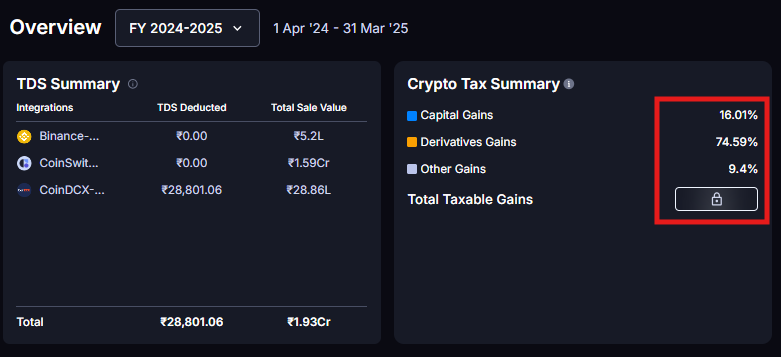
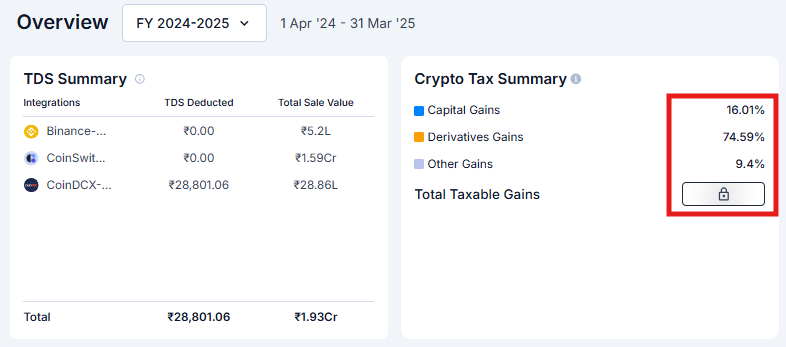
* TDS Summary (for Indian users)
* Crypto Tax Summary showing Capital Gains %, Derivatives Gains %, and Other Gains % as percentage breakdowns
 * Realised Gains/Losses by coins, category, and wallets on the Insights page
* Monthly breakdown of gains and losses on the Insights page
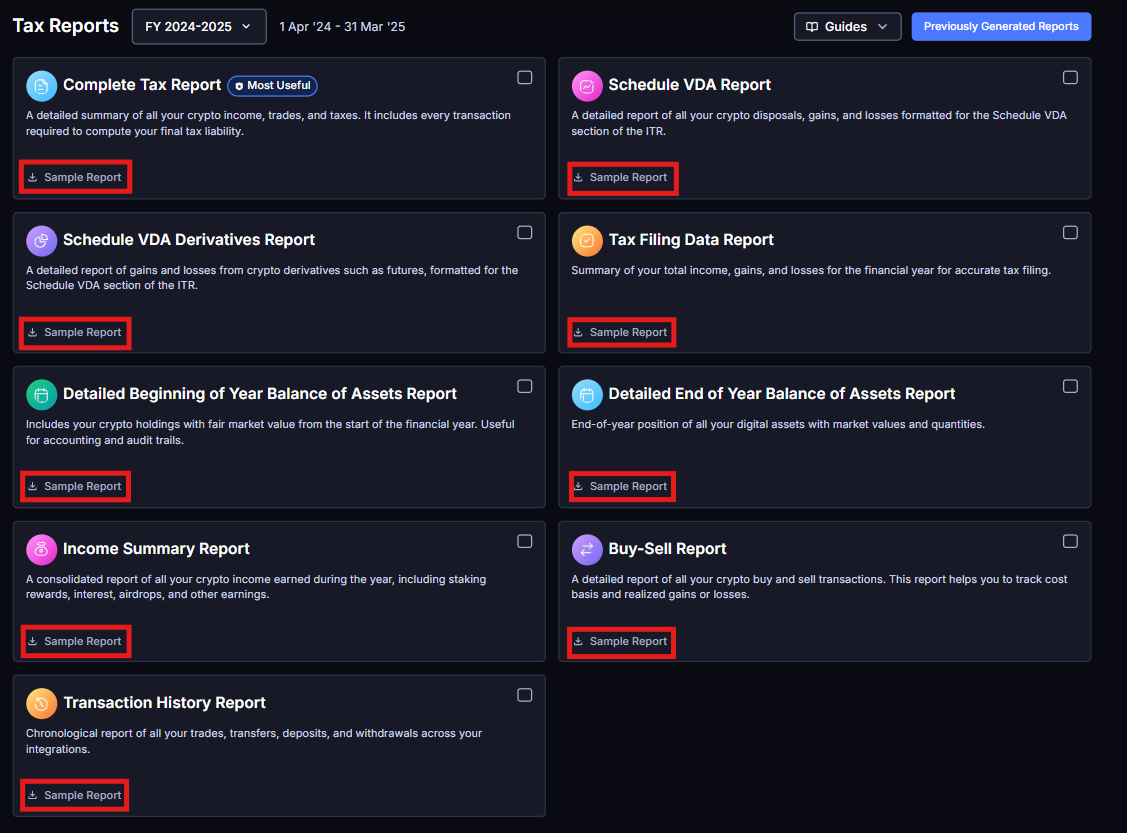
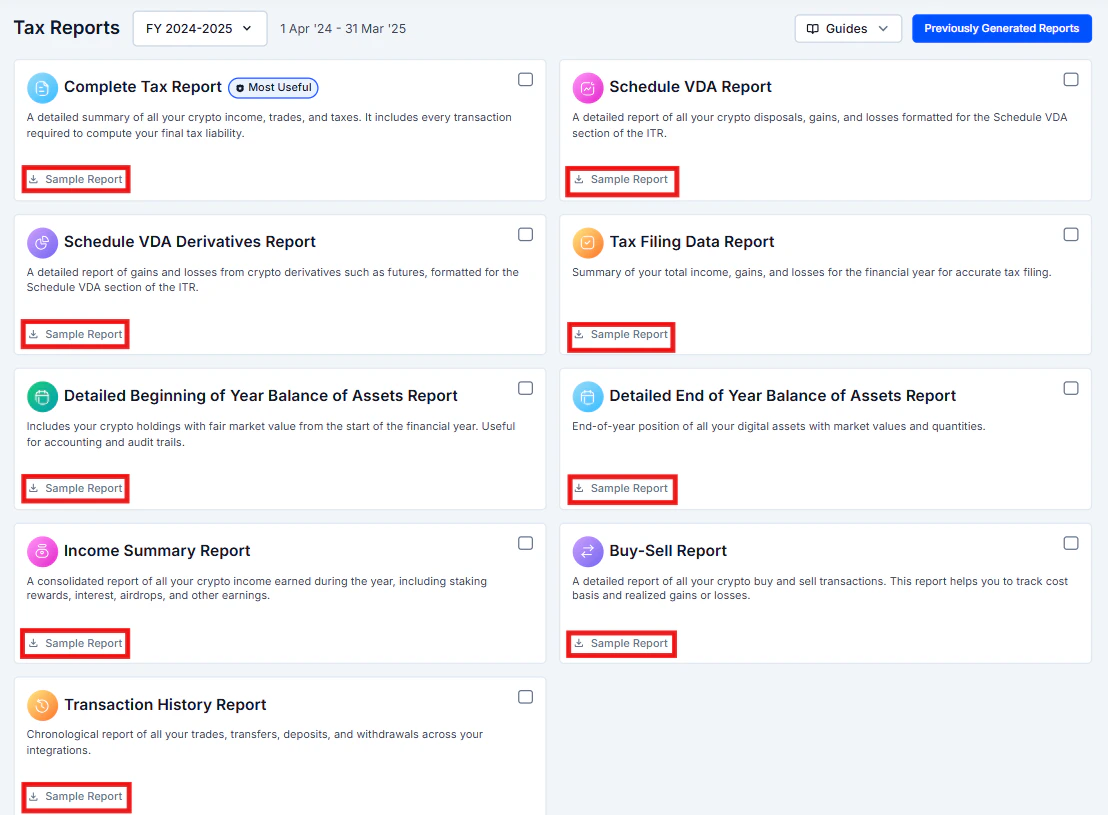
* Sample reports for every report type (look for the "Sample Report" link)
* Realised Gains/Losses by coins, category, and wallets on the Insights page
* Monthly breakdown of gains and losses on the Insights page
* Sample reports for every report type (look for the "Sample Report" link)
 **Locked until you upgrade:**
* The exact taxable amounts in numbers
**Locked until you upgrade:**
* The exact taxable amounts in numbers
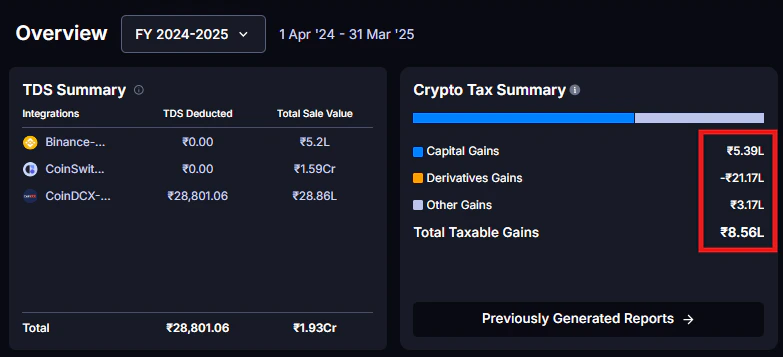
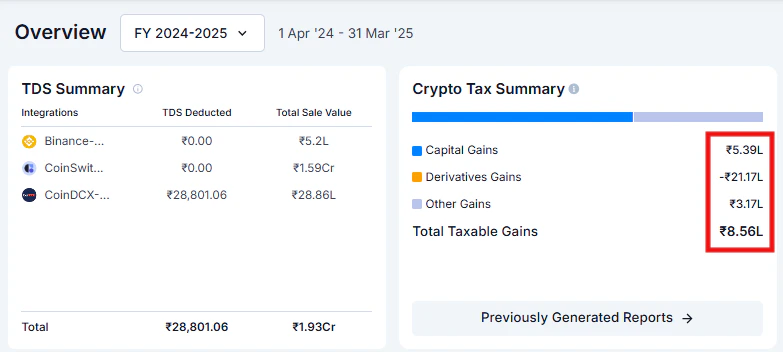 You can see the percentage breakdown of your gains before purchasing. The exact figures in INR or USD are locked until you upgrade.
***
## What If I Edit Transactions After Paying?
No problem. This is one of KoinX's most useful features.
Purchase the plan and generate your initial reports.
You notice a transaction was miscategorised or is missing.
Correct the transaction in the Transactions page.
Go back to Tax Reports and regenerate. No additional payment required.
You can do this as many times as needed. Found another issue in March? Fix and regenerate. Your CA wants a recategorisation? Fix and regenerate. All covered under the same plan.
***
## Payment Methods
**For Indian users:** UPI (GPay, PhonePe, Paytm, etc.), credit and debit cards, net banking, and wallets.
**For international users:** Credit and debit cards (Visa, Mastercard, Amex). International payment methods vary by region.
All payments are processed through secure payment gateways. KoinX does not store your card details.
***
## Troubleshooting Payment Issues
Wait 2-3 minutes and refresh the page. Sometimes it takes a moment to sync. Check your email for a payment confirmation. If reports are still locked after 15 minutes, contact support with your payment receipt.
This is usually a bank hold, not an actual charge. The amount typically auto-refunds within 5-7 business days. If it does not, contact your bank first, then KoinX support with the transaction details.
Contact KoinX support with your payment details and reason. Support will guide you through the process.
***
## Frequently Asked Questions
Indian users can pay via UPI, cards, net banking, and wallets. International users can use credit and debit cards. All payments are processed through secure payment gateways.
Unlimited. Download each report as many times as you want. There is no cap.
No. Before upgrading you can only see the percentage breakdown of your gains. The exact taxable amounts in numbers are locked until you purchase a plan for that financial year.
No. Your payment is valid permanently for that specific financial year. Come back in two years and your FY 2024-25 reports will still be accessible and downloadable.
Yes. KoinX sends a payment confirmation to your registered email. You can also find it in your Billings and Invoice page.
No. Once you have purchased a plan for a financial year, you can change settings and regenerate reports unlimited times with no additional payment.
You can see the percentage breakdown of your gains before purchasing. The exact figures in INR or USD are locked until you upgrade.
***
## What If I Edit Transactions After Paying?
No problem. This is one of KoinX's most useful features.
Purchase the plan and generate your initial reports.
You notice a transaction was miscategorised or is missing.
Correct the transaction in the Transactions page.
Go back to Tax Reports and regenerate. No additional payment required.
You can do this as many times as needed. Found another issue in March? Fix and regenerate. Your CA wants a recategorisation? Fix and regenerate. All covered under the same plan.
***
## Payment Methods
**For Indian users:** UPI (GPay, PhonePe, Paytm, etc.), credit and debit cards, net banking, and wallets.
**For international users:** Credit and debit cards (Visa, Mastercard, Amex). International payment methods vary by region.
All payments are processed through secure payment gateways. KoinX does not store your card details.
***
## Troubleshooting Payment Issues
Wait 2-3 minutes and refresh the page. Sometimes it takes a moment to sync. Check your email for a payment confirmation. If reports are still locked after 15 minutes, contact support with your payment receipt.
This is usually a bank hold, not an actual charge. The amount typically auto-refunds within 5-7 business days. If it does not, contact your bank first, then KoinX support with the transaction details.
Contact KoinX support with your payment details and reason. Support will guide you through the process.
***
## Frequently Asked Questions
Indian users can pay via UPI, cards, net banking, and wallets. International users can use credit and debit cards. All payments are processed through secure payment gateways.
Unlimited. Download each report as many times as you want. There is no cap.
No. Before upgrading you can only see the percentage breakdown of your gains. The exact taxable amounts in numbers are locked until you purchase a plan for that financial year.
No. Your payment is valid permanently for that specific financial year. Come back in two years and your FY 2024-25 reports will still be accessible and downloadable.
Yes. KoinX sends a payment confirmation to your registered email. You can also find it in your Billings and Invoice page.
No. Once you have purchased a plan for a financial year, you can change settings and regenerate reports unlimited times with no additional payment.