> ## Documentation Index
> Fetch the complete documentation index at: https://guides.koinx.com/llms.txt
> Use this file to discover all available pages before exploring further.
# TurboTax Gain-Loss Report - USA
> Learn how the TurboTax Gain-Loss report formats your crypto tax disposals for direct CSV import into TurboTax, avoiding manual entry of every trade and capital gain.
* Formatted specifically for TurboTax's CSV import feature, so you can skip manual transaction entry
* Covers all capital gains and losses from crypto disposals, both short-term and long-term
* Upload the CSV directly into TurboTax under Investment Income to populate Schedule D automatically
* Use this report instead of the Form 8949 report when filing through TurboTax
* Staking rewards and airdrops are income events, not capital gains, and must be entered separately in TurboTax
If you are filing with TurboTax, you do not want to manually enter hundreds of crypto transactions. The TurboTax Gain-Loss Report from KoinX is formatted specifically for TurboTax's import feature. Download the CSV file, upload it into TurboTax, and let the software populate your capital gains automatically.
***
## What Does the TurboTax Gain-Loss Report Contain?
The report includes the transaction details required for TurboTax to calculate your capital gains.
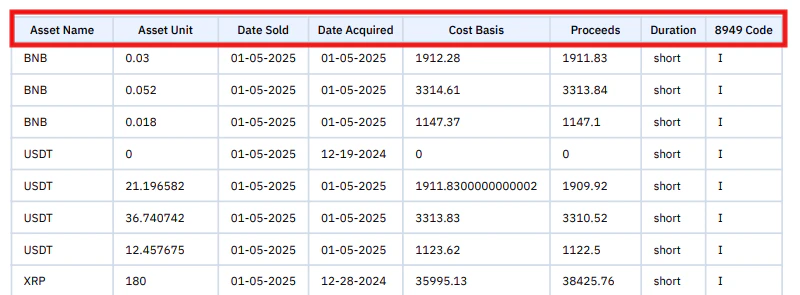 | Column | What It Means |
| ------------- | -------------------------------------------- |
| Amount | Quantity of the asset sold or disposed |
| Currency Name | Cryptocurrency involved in the transaction |
| Purchase Date | When the asset was originally acquired |
| Date Sold | When the asset was sold or disposed |
| Cost Basis | Original purchase value of the asset |
| Proceeds | Total value received when the asset was sold |
TurboTax uses this data to automatically calculate short-term capital gains, long-term capital gains, and total gains and losses.
***
## Example From the Report
| Asset Name | Asset Unit | Date Sold | Date Acquired | Cost Basis | Proceeds | Duration | 8949 Code |
| ---------- | ---------- | ---------- | ------------- | ---------- | -------- | -------- | --------- |
| BNB | 0.03 | 01-05-2025 | 01-05-2025 | 1912.28 | 1911.83 | short | I |
| BNB | 0.052 | 01-05-2025 | 01-05-2025 | 3313.84 | 3313.84 | short | I |
| BNB | 0.018 | 01-05-2025 | 01-05-2025 | 1147.10 | 1147.10 | short | I |
***
## How Is This Different from Form 8949?
| Feature | Form 8949 Report | TurboTax Gain-Loss Report |
| -------- | ---------------------------------- | ------------------------- |
| Format | PDF | CSV |
| Use Case | Manual filing or CPAs | TurboTax import |
| Data | Same transactions | Same transactions |
| Best For | Paper filing or other tax software | TurboTax users |
The data is identical; only the format differs.
***
## How to Import into TurboTax
| Column | What It Means |
| ------------- | -------------------------------------------- |
| Amount | Quantity of the asset sold or disposed |
| Currency Name | Cryptocurrency involved in the transaction |
| Purchase Date | When the asset was originally acquired |
| Date Sold | When the asset was sold or disposed |
| Cost Basis | Original purchase value of the asset |
| Proceeds | Total value received when the asset was sold |
TurboTax uses this data to automatically calculate short-term capital gains, long-term capital gains, and total gains and losses.
***
## Example From the Report
| Asset Name | Asset Unit | Date Sold | Date Acquired | Cost Basis | Proceeds | Duration | 8949 Code |
| ---------- | ---------- | ---------- | ------------- | ---------- | -------- | -------- | --------- |
| BNB | 0.03 | 01-05-2025 | 01-05-2025 | 1912.28 | 1911.83 | short | I |
| BNB | 0.052 | 01-05-2025 | 01-05-2025 | 3313.84 | 3313.84 | short | I |
| BNB | 0.018 | 01-05-2025 | 01-05-2025 | 1147.10 | 1147.10 | short | I |
***
## How Is This Different from Form 8949?
| Feature | Form 8949 Report | TurboTax Gain-Loss Report |
| -------- | ---------------------------------- | ------------------------- |
| Format | PDF | CSV |
| Use Case | Manual filing or CPAs | TurboTax import |
| Data | Same transactions | Same transactions |
| Best For | Paper filing or other tax software | TurboTax users |
The data is identical; only the format differs.
***
## How to Import into TurboTax
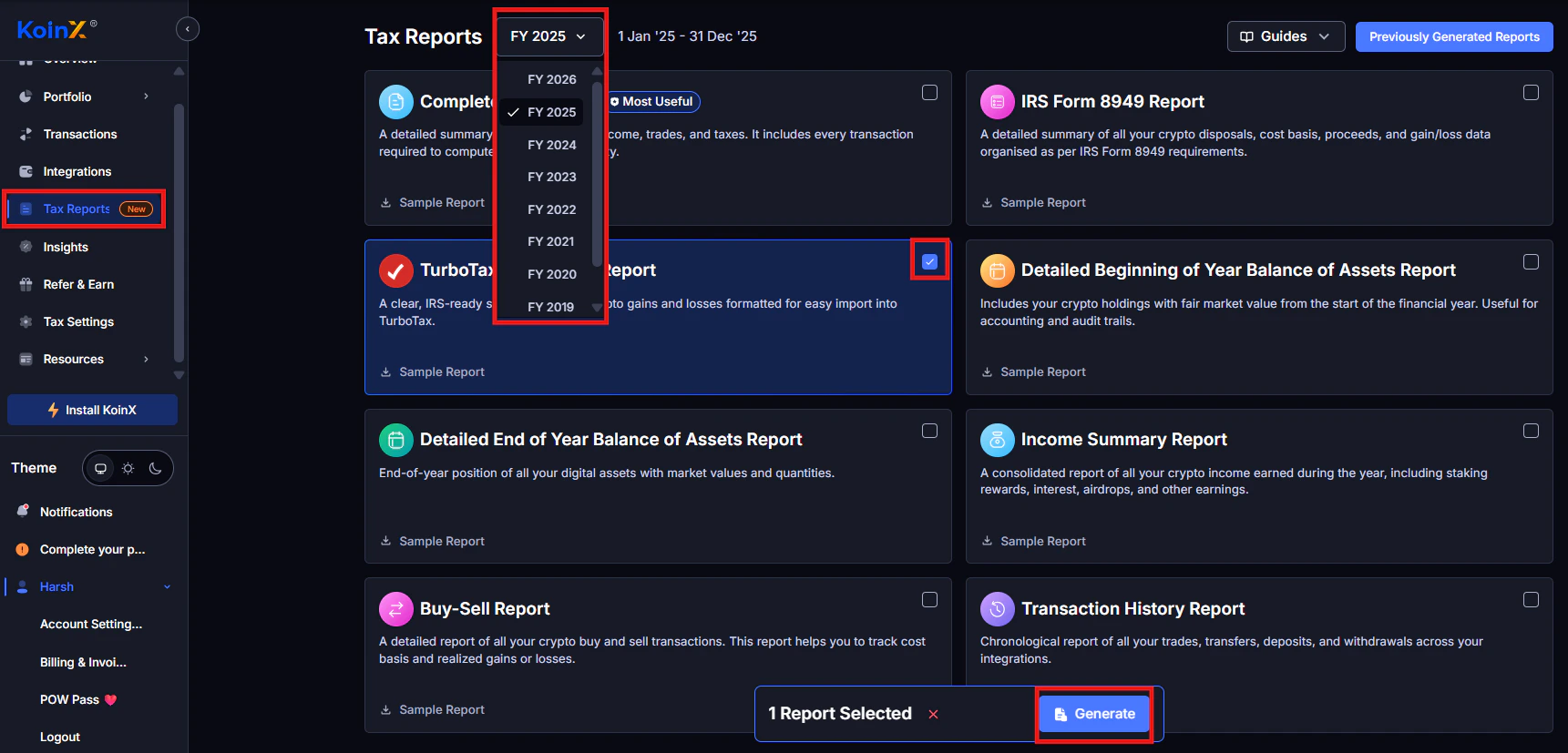
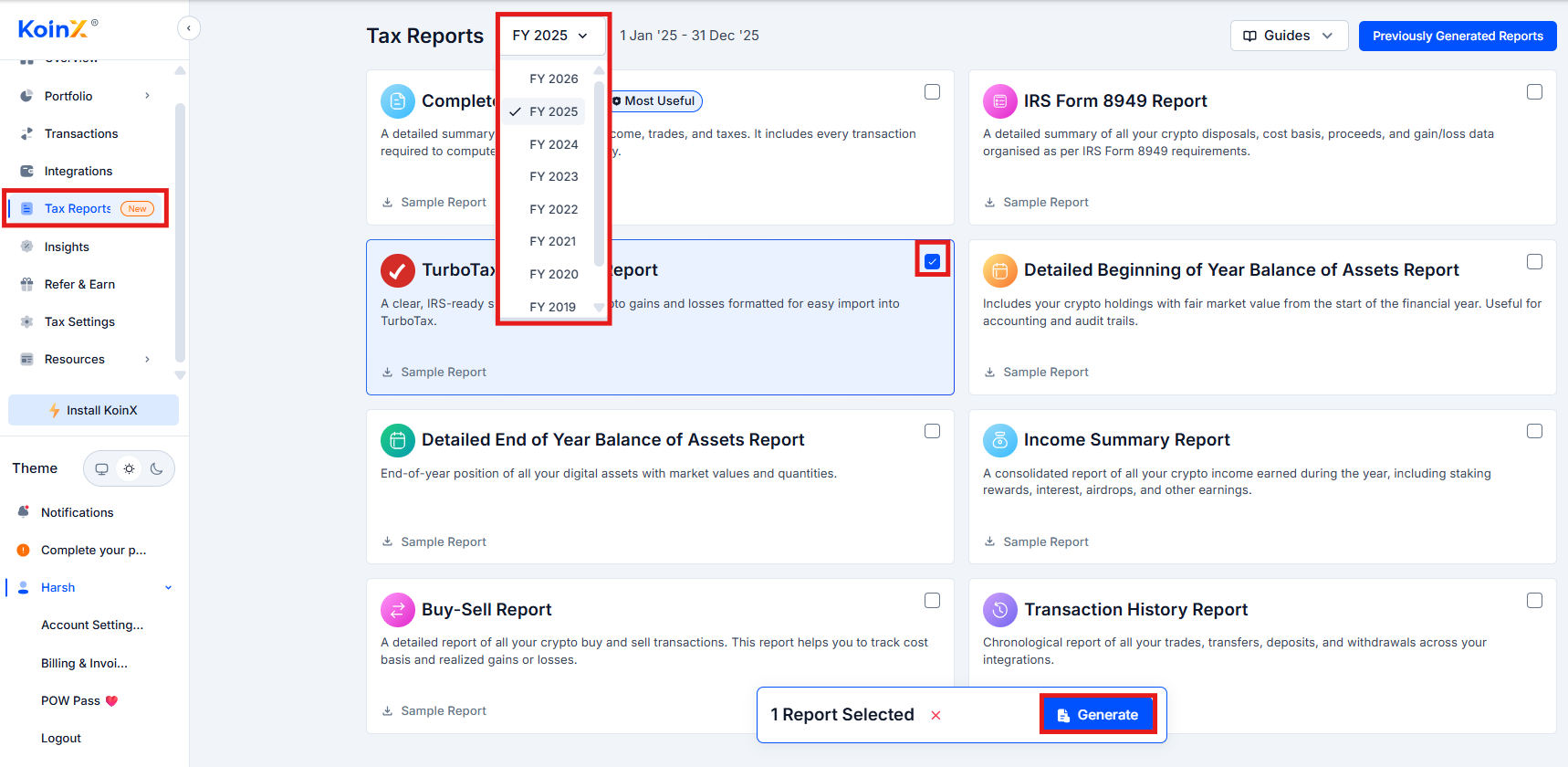 Go to Tax Reports, select the correct tax year, locate the TurboTax Gain-Loss Report, click Generate, and download the CSV file.
Open TurboTax and navigate to Investment Income. Select Stocks, Cryptocurrency, Mutual Funds, Bonds, Other. Choose Upload CSV or Import from file, then upload the KoinX CSV file.
TurboTax will import and categorise the transactions, then automatically populate Schedule D.
***
## What Transactions Are Included?
The report includes capital gains events only.
| Included | Not Included |
| ------------------------ | ---------------- |
| Crypto sold for fiat | Crypto purchases |
| Crypto-to-crypto trades | Wallet transfers |
| Crypto used for payments | Staking rewards |
| All taxable disposals | Airdrops |
Income events must be reported separately in TurboTax's income section.
***
## Does KoinX Directly Integrate With TurboTax?
No live API connection exists. The workflow is: KoinX calculates gains and losses, you download the TurboTax CSV, and TurboTax imports the file. This is the standard workflow used by most crypto tax platforms.
***
## Common TurboTax Import Issues
**File format not recognised:** Make sure you downloaded the TurboTax Gain-Loss Report, not the Form 8949 PDF.
**Date format error:** Do not edit the CSV in Excel before importing. Re-download the original file if formatting changed.
**Missing transactions:** This can occur if some exchanges were not integrated, transaction data is incomplete, or your TurboTax version has import limits.
***
## TurboTax Version Requirements
Crypto imports may require TurboTax Premier or TurboTax Self-Employed. Basic versions may not support large transaction imports.
***
## Frequently Asked Questions
No. TurboTax generates Form 8949 automatically after importing the CSV.
Some TurboTax versions have import limits. If you exceed them, consider using TurboTax Premier or Self-Employed.
No. Staking rewards and airdrops are income events, not capital gains. These must be entered separately in TurboTax.
***
Go to Tax Reports, select the correct tax year, locate the TurboTax Gain-Loss Report, click Generate, and download the CSV file.
Open TurboTax and navigate to Investment Income. Select Stocks, Cryptocurrency, Mutual Funds, Bonds, Other. Choose Upload CSV or Import from file, then upload the KoinX CSV file.
TurboTax will import and categorise the transactions, then automatically populate Schedule D.
***
## What Transactions Are Included?
The report includes capital gains events only.
| Included | Not Included |
| ------------------------ | ---------------- |
| Crypto sold for fiat | Crypto purchases |
| Crypto-to-crypto trades | Wallet transfers |
| Crypto used for payments | Staking rewards |
| All taxable disposals | Airdrops |
Income events must be reported separately in TurboTax's income section.
***
## Does KoinX Directly Integrate With TurboTax?
No live API connection exists. The workflow is: KoinX calculates gains and losses, you download the TurboTax CSV, and TurboTax imports the file. This is the standard workflow used by most crypto tax platforms.
***
## Common TurboTax Import Issues
**File format not recognised:** Make sure you downloaded the TurboTax Gain-Loss Report, not the Form 8949 PDF.
**Date format error:** Do not edit the CSV in Excel before importing. Re-download the original file if formatting changed.
**Missing transactions:** This can occur if some exchanges were not integrated, transaction data is incomplete, or your TurboTax version has import limits.
***
## TurboTax Version Requirements
Crypto imports may require TurboTax Premier or TurboTax Self-Employed. Basic versions may not support large transaction imports.
***
## Frequently Asked Questions
No. TurboTax generates Form 8949 automatically after importing the CSV.
Some TurboTax versions have import limits. If you exceed them, consider using TurboTax Premier or Self-Employed.
No. Staking rewards and airdrops are income events, not capital gains. These must be entered separately in TurboTax.
***