> ## Documentation Index
> Fetch the complete documentation index at: https://guides.koinx.com/llms.txt
> Use this file to discover all available pages before exploring further.
# Spam Tokens & Token Mapping
> Learn how to handle spam tokens and wrong price feeds in KoinX so junk airdrops and token mapping errors don’t distort your portfolio or crypto tax calculations.
Two separate problems tend to land in the same neighbourhood and get confused with each other.
**Spam tokens** are worthless or scam tokens that appear in your wallet without you asking for them. They show up in your transaction history, sometimes with inflated fake values, and can pollute your tax report if left unaddressed.
**Token mapping errors** are different. These involve real coins you actually hold, but KoinX has linked them to the wrong price feed. Your ETH transaction is showing a completely wrong value. That token you swapped shows ₹0. These are data quality issues, not spam.
This article covers both, plus a third scenario: what to do when a token you hold has been renamed, rebranded, or migrated to a new contract.
* Spam tokens are junk airdropped into your wallet by scammers, mark them as spam to exclude them from your tax report
* Token mapping errors happen when KoinX links a real coin to the wrong price feed, causing incorrect values
* Use "Mark as Spam" for junk tokens and "Migrate Coin(s)" for mapping errors, they're different tools for different problems
* Renamed or migrated tokens (like MATIC → POL) need manual attention using the Token Migration feature to keep your cost basis accurate
***
## Spam Tokens: What They Are and Why They Show Up
Random tokens appearing in your wallet uninvited is one of the most frustrating parts of being active on-chain. Here's what's actually happening:
Bad actors airdrop worthless tokens (sometimes with names like "\$10,000 CLAIM REWARDS") into thousands of wallets at once. The tokens themselves are worth nothing. The scam is in what happens next: they want you to visit their website to "claim" more tokens. Connecting your wallet to that site or approving a transaction from it is where your funds are at risk.
**For tax purposes:** These tokens have no real value, but if left unaddressed in KoinX, they may appear in your income calculation as if they were real airdrops.
KoinX automatically flags known spam tokens based on multiple signals: the coin's reputation, on-chain behaviour, and value indicators. But it's not a perfect system. You may need to manually mark tokens as spam, or unmark real tokens that got incorrectly flagged.
***
## How to Mark a Token as Spam
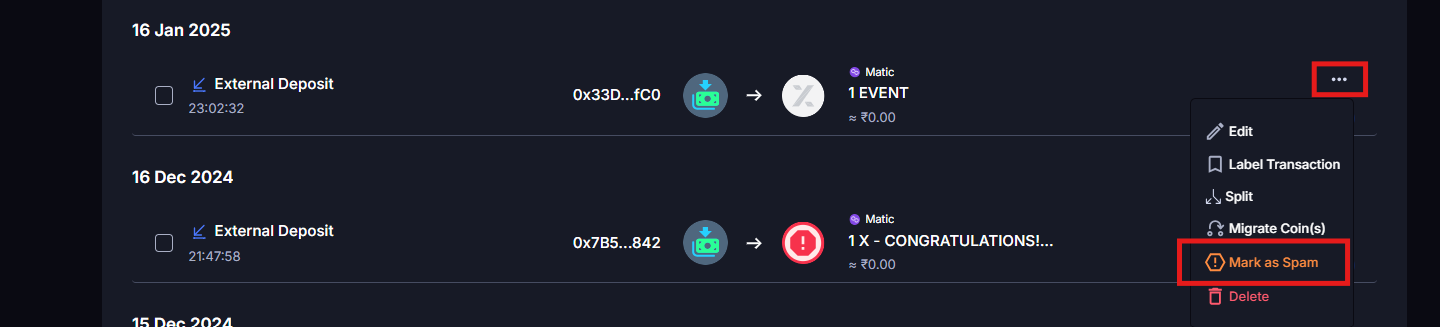
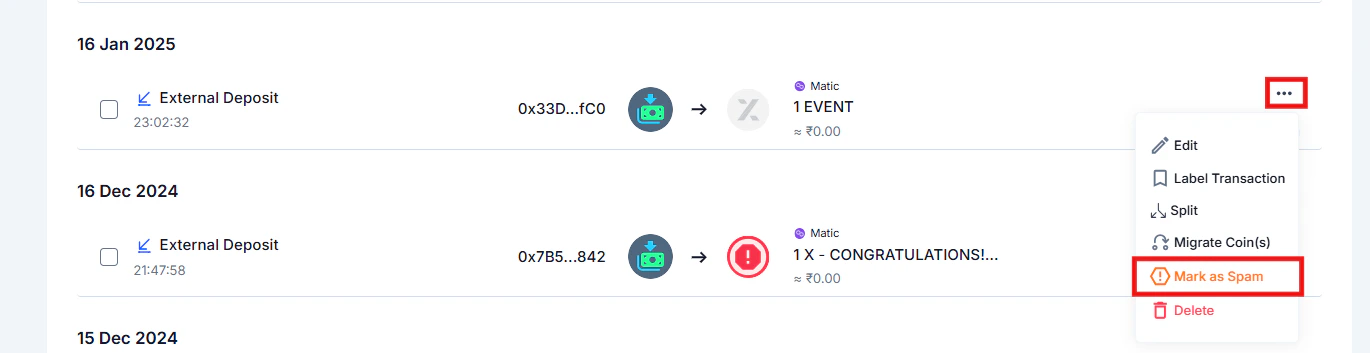 Choose based on your situation. If the token is clearly junk across all your accounts, select **All transactions** for a clean sweep.
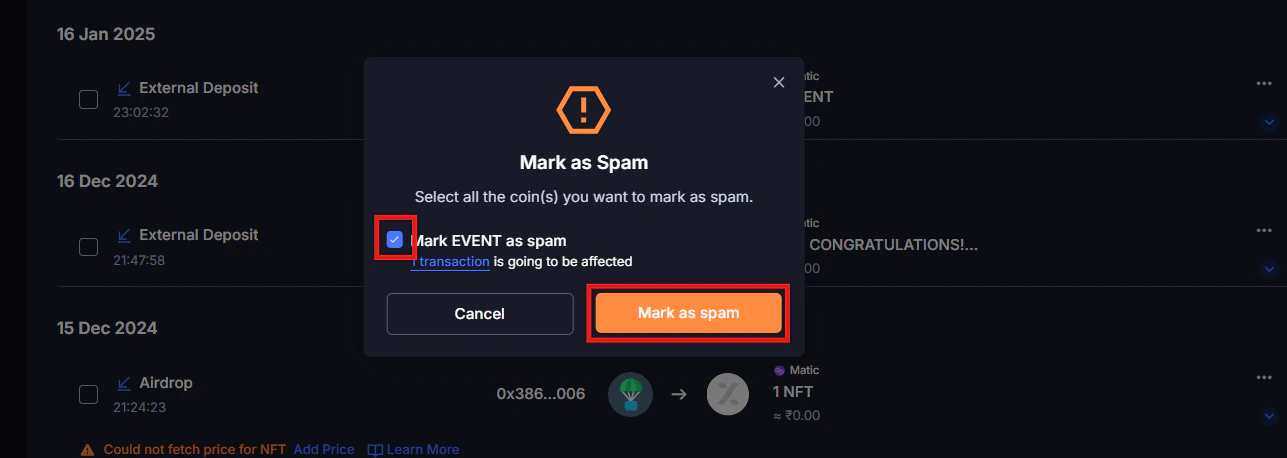
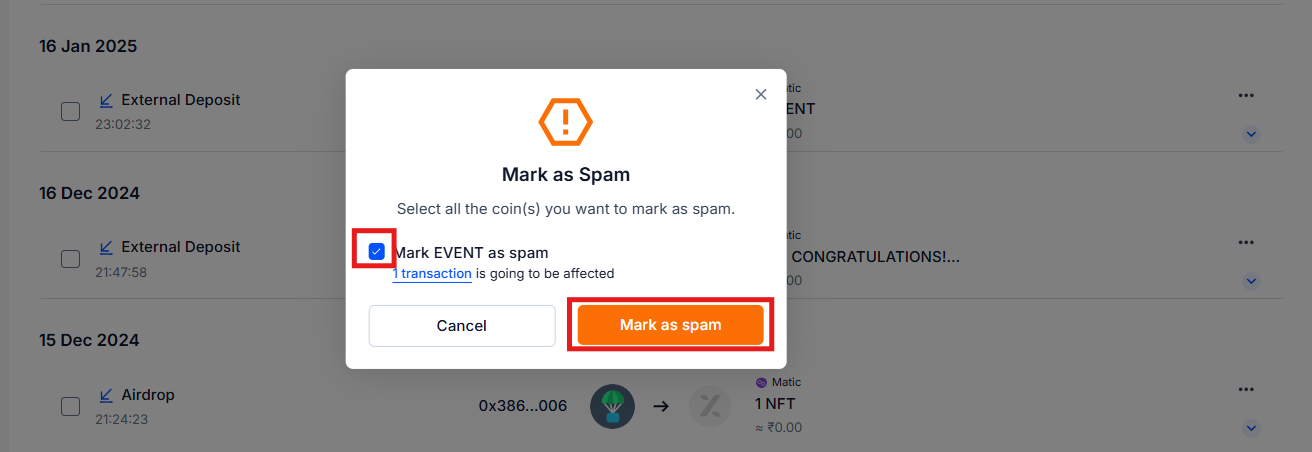 Only mark a token as spam if you're confident it's worthless. Marking a real token as spam removes it from your portfolio and tax report entirely, which means missing a taxable event if you ever sell it. When in doubt, leave it as-is and consult your CA.
***
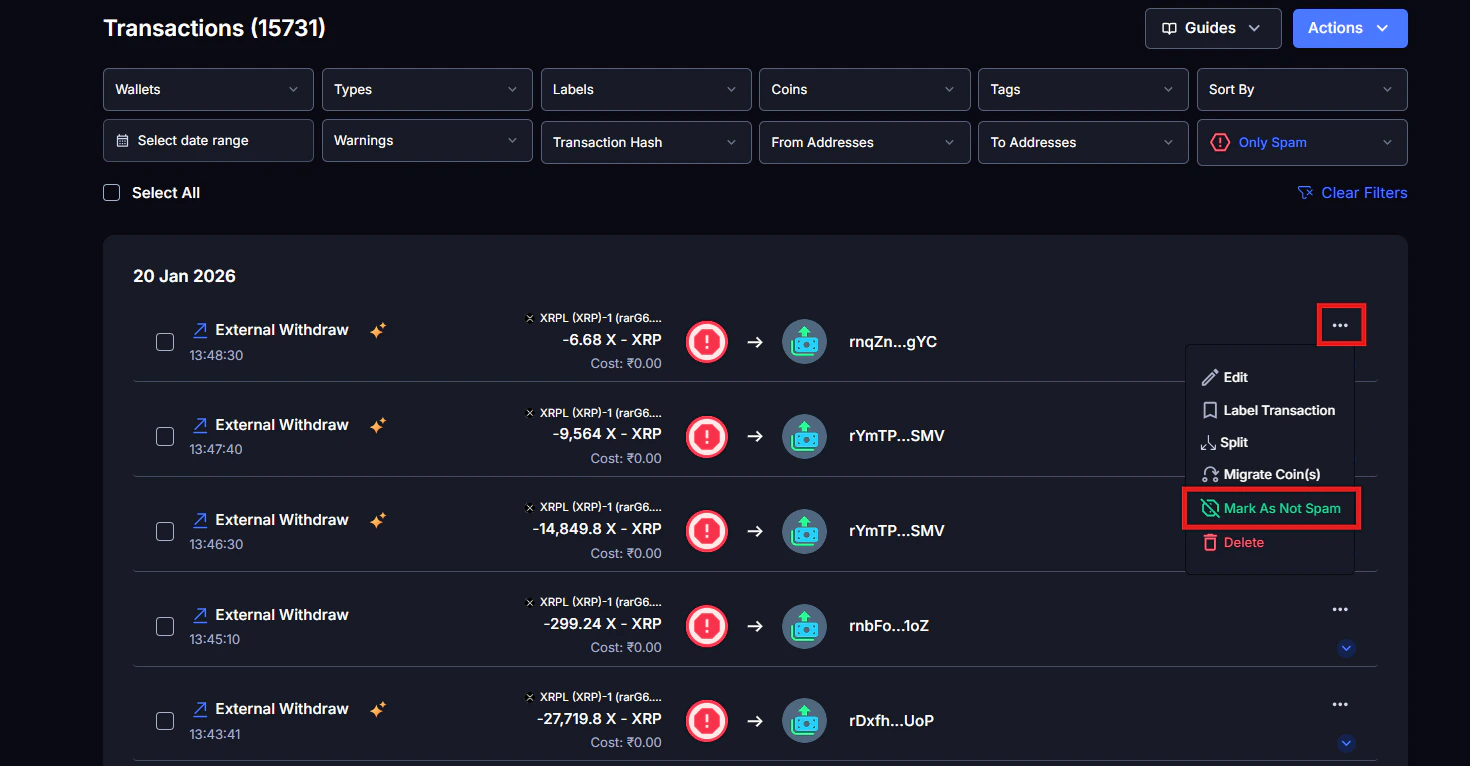
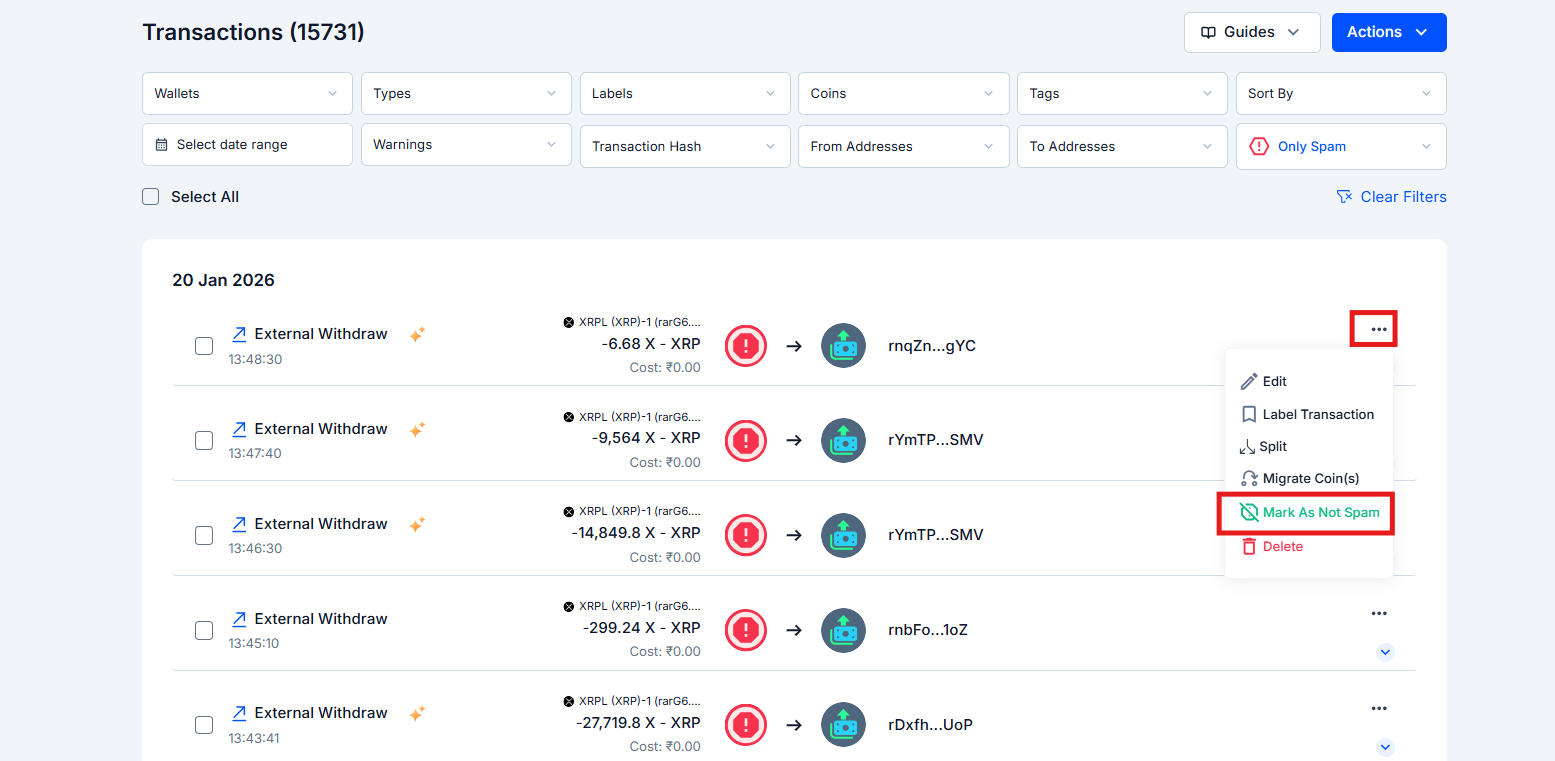
## How to Find and Unmark Incorrectly Flagged Tokens
If KoinX has marked a real token as spam:
The token returns to your active transactions immediately and is included in calculations again.
Only mark a token as spam if you're confident it's worthless. Marking a real token as spam removes it from your portfolio and tax report entirely, which means missing a taxable event if you ever sell it. When in doubt, leave it as-is and consult your CA.
***
## How to Find and Unmark Incorrectly Flagged Tokens
If KoinX has marked a real token as spam:
The token returns to your active transactions immediately and is included in calculations again.
 ***
## Token Mapping Errors: What They Are and How to Fix Them
### What is token mapping?
Token mapping is how KoinX connects a ticker symbol (like "USDC" or "MATIC") to a price feed. When the mapping is correct, your transactions show accurate market values. When it's wrong, the values can be way off.
### Why mapping errors happen
* **Shared ticker symbols**: two completely different tokens can share the same ticker (e.g., "USDC" exists on multiple chains, and a bridged version might map to the wrong price feed)
* **Newly listed tokens**: tokens listed recently may not yet be in KoinX's database
* **Rebranded tokens**: a token changes its name or migrates to a new contract
### How to identify a mapping error
Look for transactions where:
* The market value is showing ₹0 for a coin you know has a real price
* The value is dramatically too high or too low compared to what you'd expect
* A token you hold is showing the price of a completely different, unrelated coin
### How to fix a token mapping error
***
## Token Mapping Errors: What They Are and How to Fix Them
### What is token mapping?
Token mapping is how KoinX connects a ticker symbol (like "USDC" or "MATIC") to a price feed. When the mapping is correct, your transactions show accurate market values. When it's wrong, the values can be way off.
### Why mapping errors happen
* **Shared ticker symbols**: two completely different tokens can share the same ticker (e.g., "USDC" exists on multiple chains, and a bridged version might map to the wrong price feed)
* **Newly listed tokens**: tokens listed recently may not yet be in KoinX's database
* **Rebranded tokens**: a token changes its name or migrates to a new contract
### How to identify a mapping error
Look for transactions where:
* The market value is showing ₹0 for a coin you know has a real price
* The value is dramatically too high or too low compared to what you'd expect
* A token you hold is showing the price of a completely different, unrelated coin
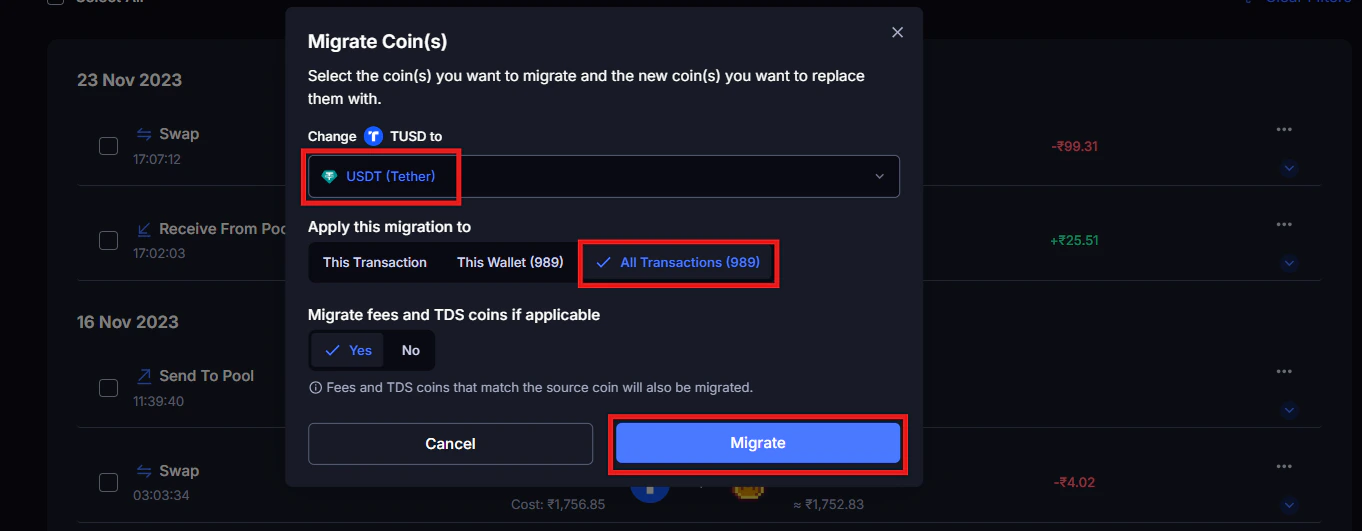
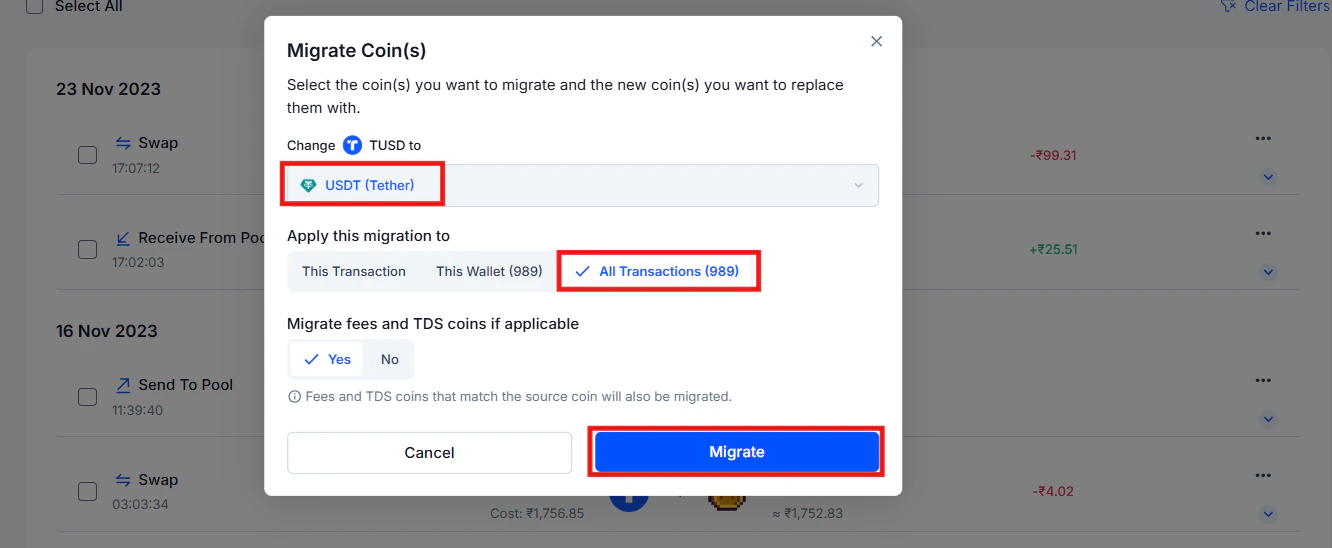
### How to fix a token mapping error
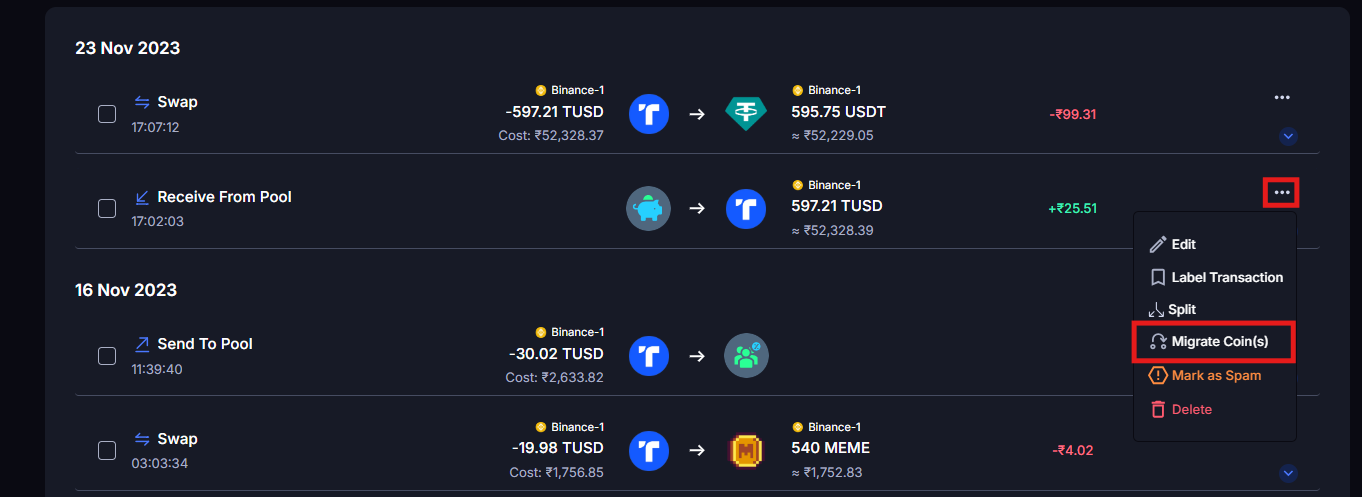
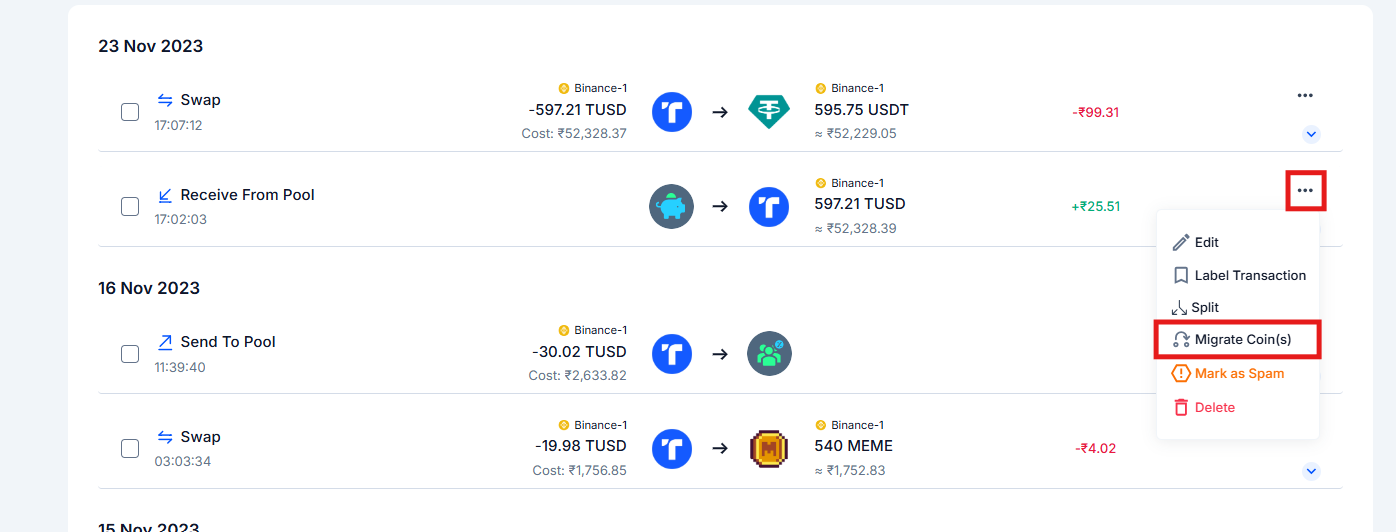 * **This transaction**: remaps only this one transaction
* **This wallet**: remaps all transactions for this token in the current wallet
* **All transactions**: remaps all transactions for this token across all integrations
* **This transaction**: remaps only this one transaction
* **This wallet**: remaps all transactions for this token in the current wallet
* **All transactions**: remaps all transactions for this token across all integrations
 ***
## Renamed and Migrated Tokens
Tokens change over time. Projects rebrand. Blockchains upgrade. Some tokens migrate to an entirely new contract address with a new ticker, like MATIC's migration to POL.
### How KoinX handles token migration
KoinX sometimes does **not** handle token migrations automatically. When a token migrates (like MATIC → POL), you need to use the **Token Migration** feature to update your records manually.
What happens when you run a migration: KoinX changes the old token to the new migrated token across your transaction history. No new transaction is created, and the original transaction categories remain the same. Koinx simply updates the token label to reflect the new contract. Your cost basis from the original acquisition carries forward correctly under the new token name.
### How to run Token Migration
Your holdings will now reflect the correct token name, and all historical cost basis data carries forward.
Token migrations may or may not create a taxable event depending on whether there's a capital gain at the time of migration. Most 1:1 token migrations don't result in capital gains, but this depends on the specific circumstances. Consult your CA to confirm the tax treatment for any migration event in your history.
***
## Common Issues / Edge Cases
Use the Spam filter on the Transactions page to find it, then select **Mark As Not Spam**. It will return to your active portfolio and tax calculations.
Not necessarily. Logos are cosmetic and don't affect tax calculations. But a wrong logo can sometimes signal an underlying mapping issue. Check the price history in the transaction details, if the values look right, it's just a display quirk. If the prices look completely wrong, use Migrate Coin(s) to remap.
This is a mapping overlap. Use Migrate Coin(s) on the incorrectly mapped transactions to reassign them to the right token. If the issue is widespread, contact KoinX support. This may need to be resolved at the database level.
***
## Frequently Asked Questions
Check the contract address on a block explorer (Etherscan, BscScan, etc.). If the token has zero liquidity, no verified contract, or is listed on spam token databases, it's safe to mark as spam. If it has trading activity and a verified contract, it's likely a real token.
This is usually a mapping error. Koinx isn't connected to the right price feed for that token. Try using Migrate Coin(s) to link it to the correct coin in KoinX's database. If the token is too new or too obscure to be in the database, you may need to add the price manually using the Edit option.
After migrating, trigger a fresh sync from the Integrations page. If the price still looks wrong after syncing, the token may be mapped to a coin that shares the same name but is a different asset. Contact KoinX support with the contract address of the correct token.
Yes, when you run Migrate Coin(s) and select "All transactions," it remaps every transaction for that token simultaneously. You don't have to fix them one by one.
***
## Renamed and Migrated Tokens
Tokens change over time. Projects rebrand. Blockchains upgrade. Some tokens migrate to an entirely new contract address with a new ticker, like MATIC's migration to POL.
### How KoinX handles token migration
KoinX sometimes does **not** handle token migrations automatically. When a token migrates (like MATIC → POL), you need to use the **Token Migration** feature to update your records manually.
What happens when you run a migration: KoinX changes the old token to the new migrated token across your transaction history. No new transaction is created, and the original transaction categories remain the same. Koinx simply updates the token label to reflect the new contract. Your cost basis from the original acquisition carries forward correctly under the new token name.
### How to run Token Migration
Your holdings will now reflect the correct token name, and all historical cost basis data carries forward.
Token migrations may or may not create a taxable event depending on whether there's a capital gain at the time of migration. Most 1:1 token migrations don't result in capital gains, but this depends on the specific circumstances. Consult your CA to confirm the tax treatment for any migration event in your history.
***
## Common Issues / Edge Cases
Use the Spam filter on the Transactions page to find it, then select **Mark As Not Spam**. It will return to your active portfolio and tax calculations.
Not necessarily. Logos are cosmetic and don't affect tax calculations. But a wrong logo can sometimes signal an underlying mapping issue. Check the price history in the transaction details, if the values look right, it's just a display quirk. If the prices look completely wrong, use Migrate Coin(s) to remap.
This is a mapping overlap. Use Migrate Coin(s) on the incorrectly mapped transactions to reassign them to the right token. If the issue is widespread, contact KoinX support. This may need to be resolved at the database level.
***
## Frequently Asked Questions
Check the contract address on a block explorer (Etherscan, BscScan, etc.). If the token has zero liquidity, no verified contract, or is listed on spam token databases, it's safe to mark as spam. If it has trading activity and a verified contract, it's likely a real token.
This is usually a mapping error. Koinx isn't connected to the right price feed for that token. Try using Migrate Coin(s) to link it to the correct coin in KoinX's database. If the token is too new or too obscure to be in the database, you may need to add the price manually using the Edit option.
After migrating, trigger a fresh sync from the Integrations page. If the price still looks wrong after syncing, the token may be mapped to a coin that shares the same name but is a different asset. Contact KoinX support with the contract address of the correct token.
Yes, when you run Migrate Coin(s) and select "All transactions," it remaps every transaction for that token simultaneously. You don't have to fix them one by one.