
Where to Find the Portfolio Holdings Report
Navigate to Portfolio in the left sidebar, then open the Reports tab. This section is separate from the Tax Reports page.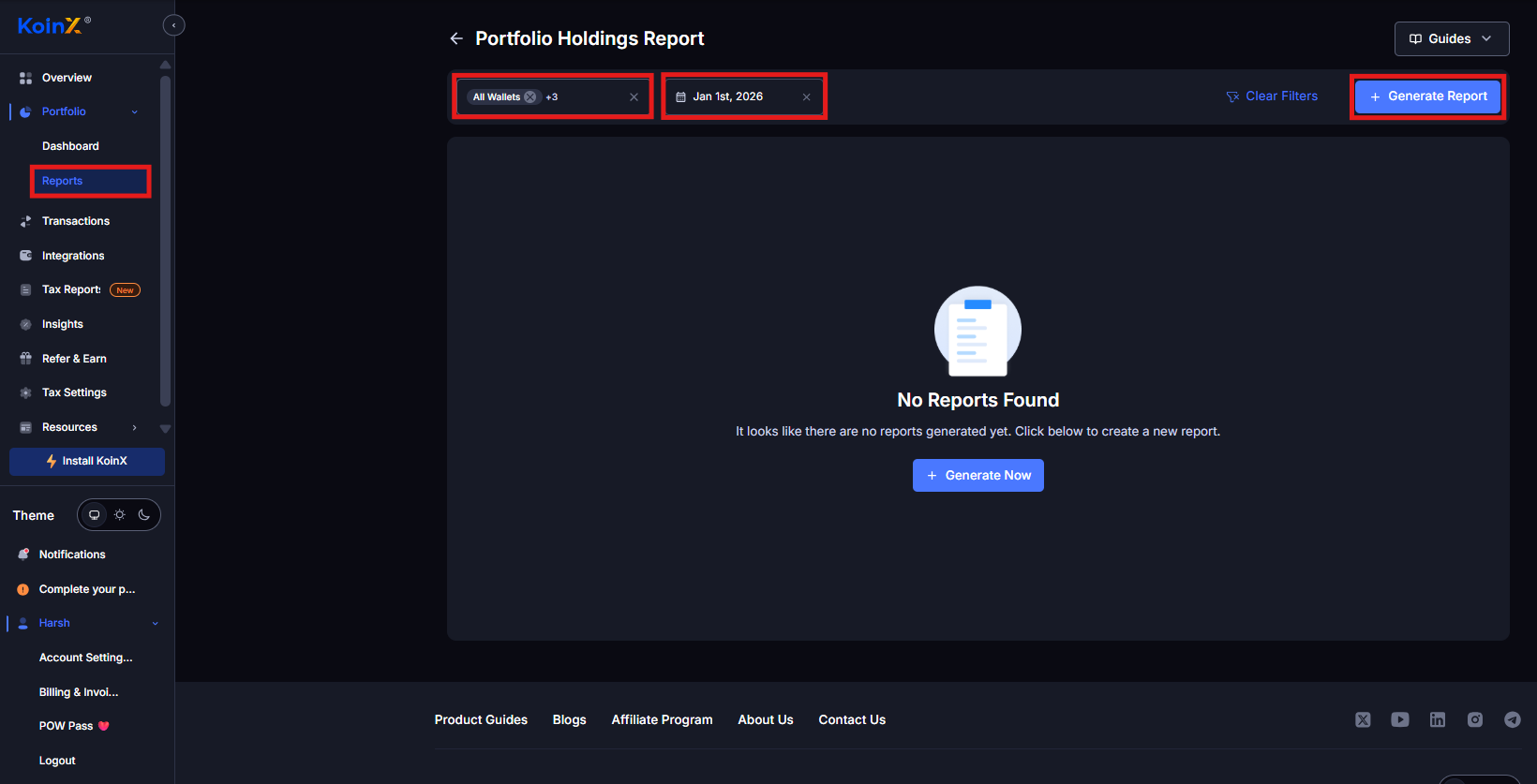
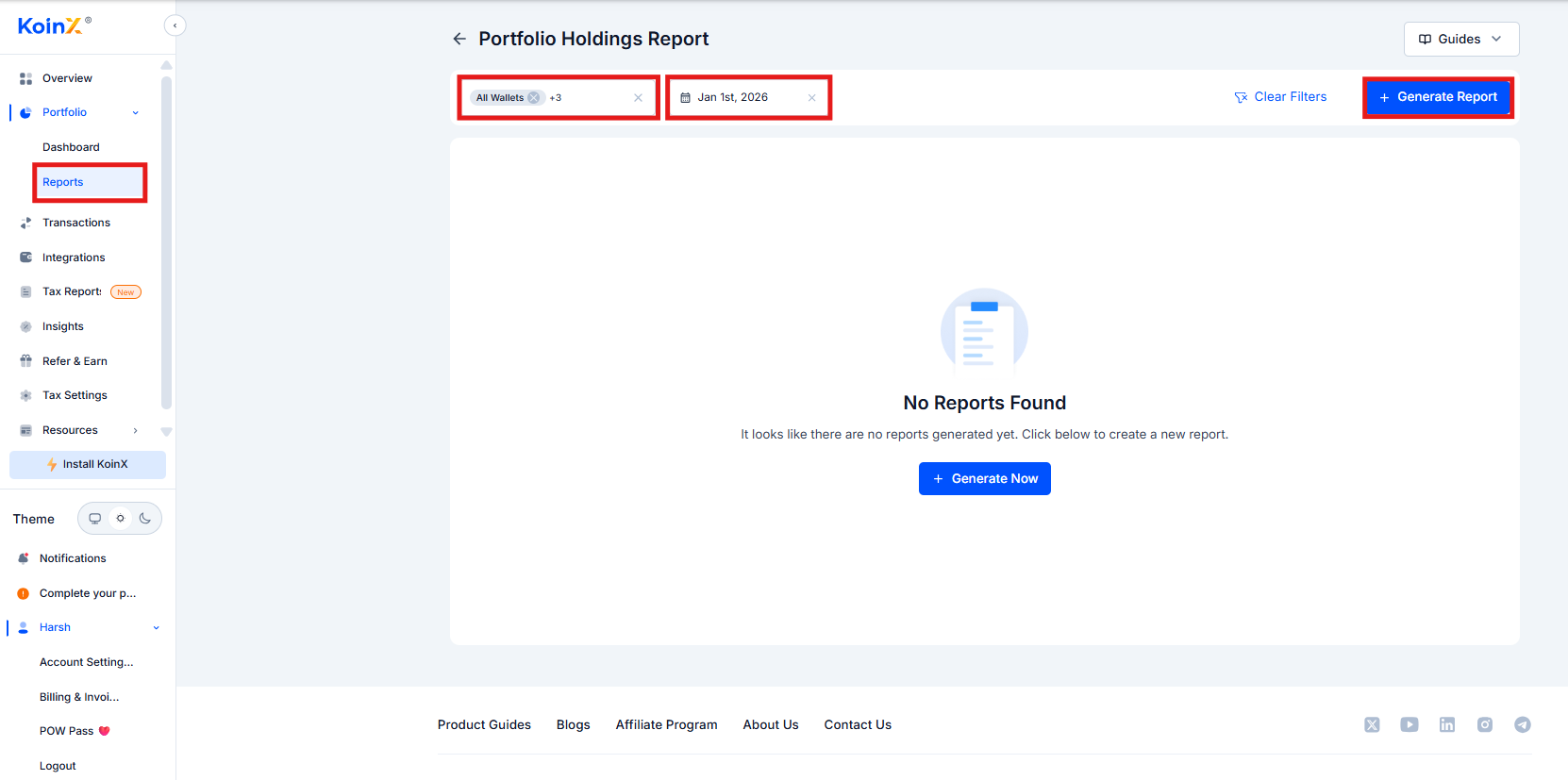
- Select a specific wallet or All Wallets
- Choose the date for the snapshot
- Generate the Portfolio Holdings Report
- Download in PDF or Excel (a copy is also sent to your registered email)
How Access to Reports Works
Portfolio reports require an active tax plan for the financial year that includes your chosen report date. Example: Your transaction history spans 2021 to 2025. You want a portfolio snapshot as of February 2024. That date falls under FY 2023-24, so you need the FY 2023-24 plan. Once purchased, the report includes all historical transactions leading up to that date, even from earlier years. So a February 2024 report will include data from 2021, 2022, 2023, and 2024 up to the selected date, all in one consolidated report.How this differs from Tax Reports
Tax reports require separate plans for each financial year. Portfolio reports work differently: you only need the plan for the financial year containing your chosen report date, and all earlier data is included automatically.What the Report Contains
Report Overview
The report opens with a summary that defines its scope:- Generated For : Your account name
- Report Generated On : Date and time the report was created
- Country : Country selected in your KoinX settings
- Report Till : The snapshot date you selected
- Currency : Valuation currency (INR, USD, etc.)
Overall Summary of Holdings
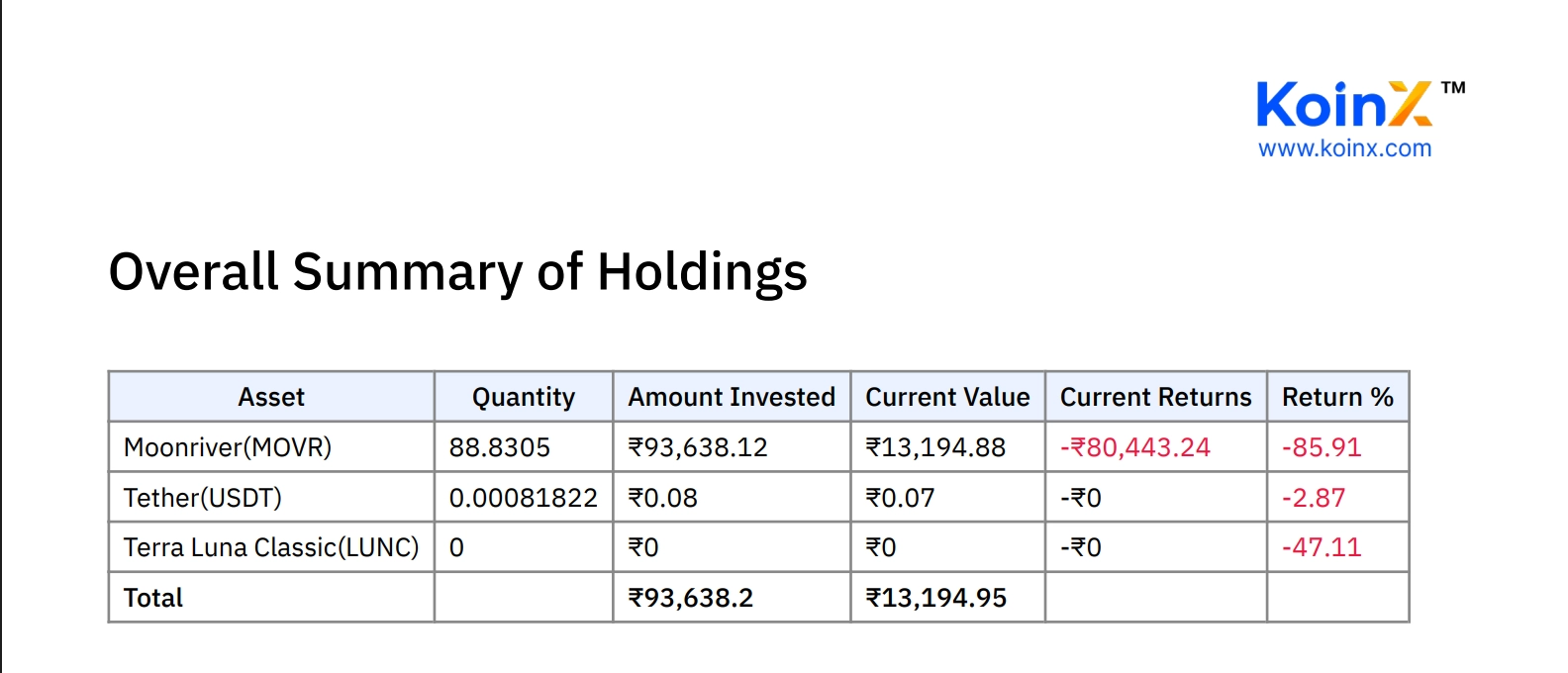
This section helps you quickly identify your largest holdings, which assets are profitable, and which are underperforming.
Wallet-Wise Summary
If you have multiple wallets or exchanges connected, the report also breaks down holdings by each wallet separately, such as Binance, Bybit, or on-chain wallets. This makes it easier to understand where your assets are stored and how each platform contributes to your overall portfolio.Previously Generated Reports
KoinX stores all previously generated portfolio reports so you can access them later. Inside Portfolio → Reports, scroll to the Previously Generated Reports section.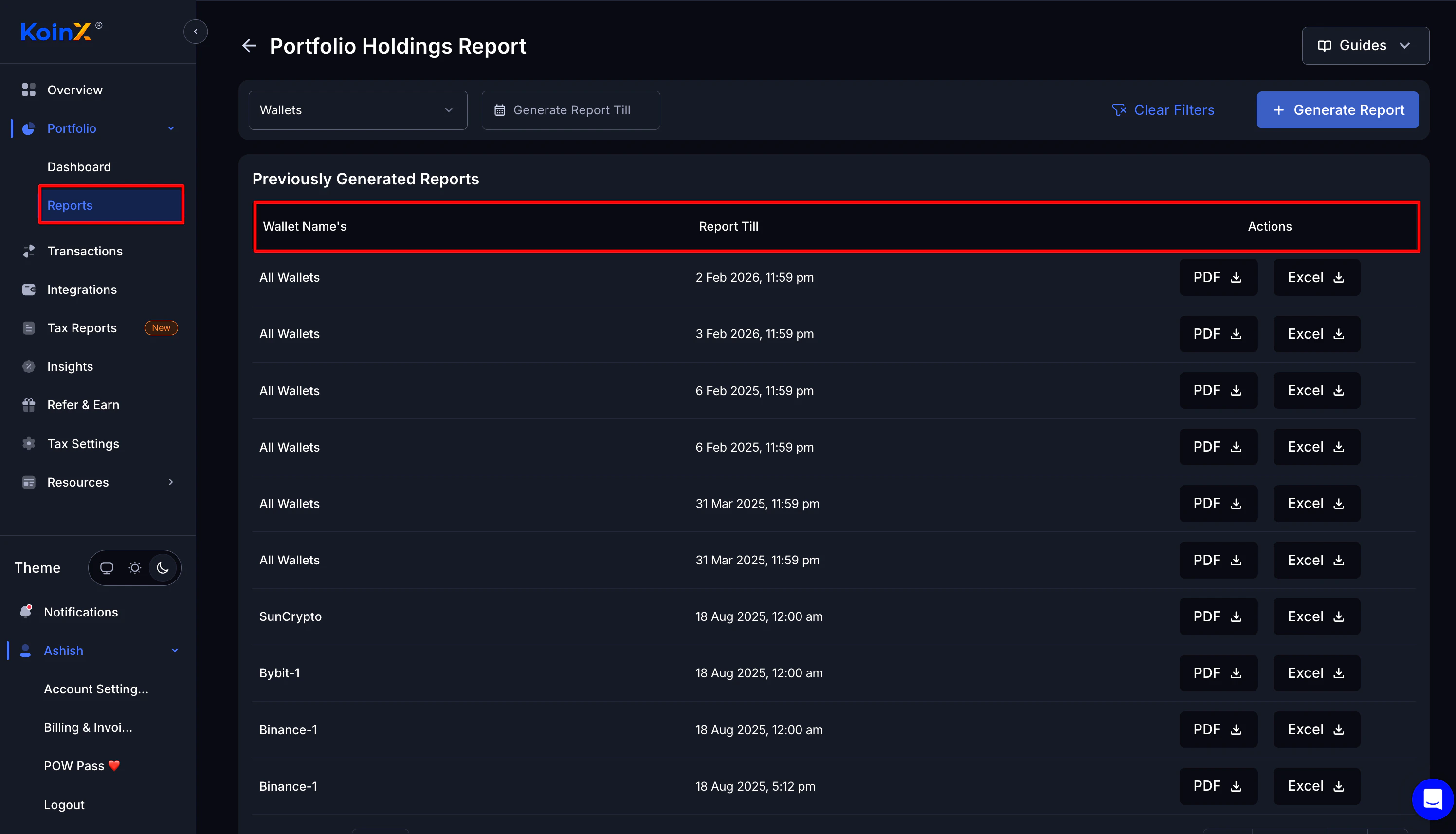
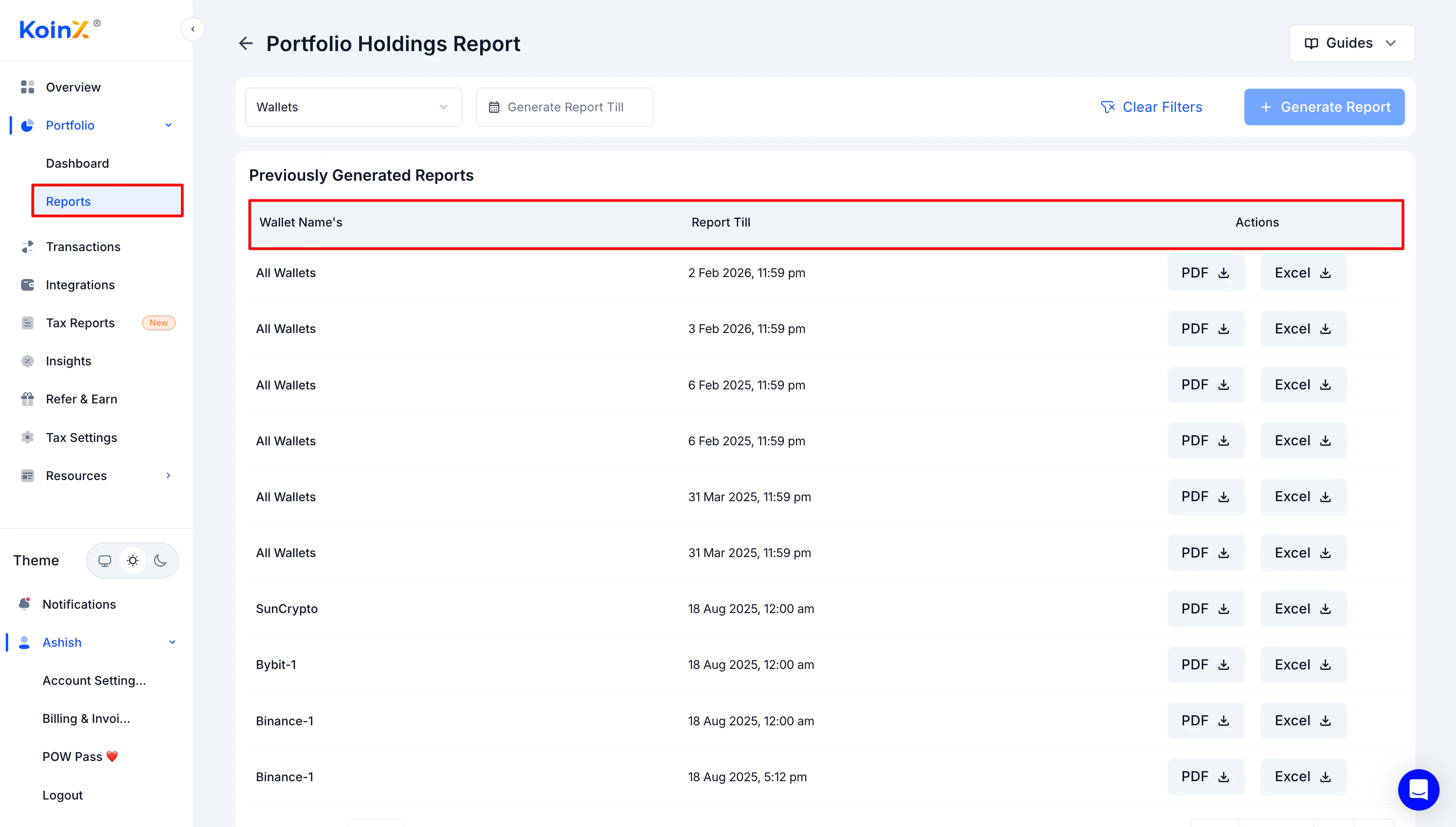
- Wallet name
- Report till date
- Download options (PDF and Excel)
Why This Report Is Useful
The Portfolio Holdings Report is helpful when you want to:- See a clear snapshot of your crypto portfolio on a specific date
- Track returns relative to your invested cost
- Monitor performance across individual assets
- Identify large exposures or concentrated positions
- Share portfolio details with a financial advisor or auditor
- Review your holdings before making portfolio decisions
Portfolio reports are based on data available at the time of calculation. Missing transactions or incomplete integrations can affect the numbers shown. Review your integrations and transaction history before generating a report to ensure accuracy.
Frequently Asked Questions
Do I need a tax plan to generate the Portfolio Holdings Report?
Do I need a tax plan to generate the Portfolio Holdings Report?
Yes. You need an active tax plan for the financial year that includes your chosen report date. Without a plan for that year, you cannot generate or download the report.
If I buy a plan for FY 2023-24, will the report include earlier transactions?
If I buy a plan for FY 2023-24, will the report include earlier transactions?
Yes. The report includes all historical transactions leading up to the selected report date, even if those transactions occurred in earlier years. You do not need separate plans for each earlier year.
Why does the report show different values from my live dashboard?
Why does the report show different values from my live dashboard?
The report captures values at the moment it was generated. If prices have moved or new transactions have been synced since then, the live dashboard will show updated values while the report remains a static snapshot of that point in time.
Can I generate multiple portfolio reports?
Can I generate multiple portfolio reports?
Yes. You can generate reports with different snapshot dates, as long as you have the appropriate financial year plan for each date.
Can I download old reports again?
Can I download old reports again?
Yes. Previously generated reports remain available in Portfolio → Reports and can be downloaded again at any time.
What formats can I download the report in?
What formats can I download the report in?
Portfolio Holdings Reports are available in both PDF and Excel format. A copy is also sent to your registered email address when the report is generated.