Some transactions will never appear in KoinX automatically. The exchange closed. You traded peer-to-peer. You received crypto as payment for freelance work three years ago. The API only goes back 180 days and your older buys are missing. For all of these situations, you can add transactions manually. It takes a little preparation. You need the right details before you start, but it’s straightforward once you’re set up. This article walks you through when to use manual entry, what information you need, and how to enter it correctly so it doesn’t create problems in your tax report.

AI Summary

  • Use manual entry when an exchange is unsupported, the API doesn’t go back far enough, or you have P2P/gift/payment transactions with no exchange record
  • You’ll need the date, asset, amount, transaction type, and price at time of transaction before you start
  • For 1–10 missing transactions, use Actions → Add Transaction
  • For larger batches, the Custom File upload is faster and less error-prone

When Should You Add Transactions Manually?

Manual entry makes sense in these situations:
  • Exchange is closed: the platform shut down, was deactivated, or simply isn’t supported by KoinX
  • API lookback limit: your exchange’s API only covers the last 90–180 days, and older transactions didn’t come through
  • P2P trades: you bought or sold crypto directly from another person with no exchange record
  • Crypto as payment: you received crypto for freelance work, services, or a sale, and there’s no exchange involved
  • Gifts received: someone sent you crypto that doesn’t appear in any connected account
Before you start entering manually, check your email. Trade confirmation receipts, withdrawal notifications, and P2P chat records are all valid records. Also check your bank statements for fiat deposits made to your exchange, they help you verify dates and amounts. Partial records are much better than guessing.

What Information You Need Before You Start

Gather this before opening the Add Transaction form:
FieldWhat to Find
Transaction typeTrade, Deposit, Withdrawal, Expense, Future Trade, Margin Trade
Transaction LabelDepends on type, e.g., for Deposit: Airdrop, Reward, Staking Interest, Mining Income, etc.; for Withdrawal: Stake, Donation, Funding Fee, etc.; for Trade: Buy, Sell, Swap
Choose A WalletChoose the wallet where you want to add this transaction
CurrencySelect the coin you want to add
Number of CoinsAdd the quantity of those coins
Market PriceAdd the price of that coin
AmountCalculated automatically once you add the price
TDSOptional, if TDS is deducted, add the coin name and quantity
FeesOptional, add fee details if any fee was deducted during the transaction
Transaction Date and TimeThe exact time and date when the transaction was made
To AddressThe sent wallet address, optional
From AddressThe receiving wallet address, optional
Transaction HashUnique identifier assigned to every blockchain transaction, optional
DescriptionA short note for your own reference, helps you remember context when reviewing later
Where to find historical prices:
  • CoinGecko, search for the coin, go to the Historical Data tab, find the date
  • CoinMarketCap, same process
  • Block explorer, for on-chain transactions, the swap value in ETH or USDC can help you calculate an approximate price

Step-by-Step: How to Add a Transaction Manually

1

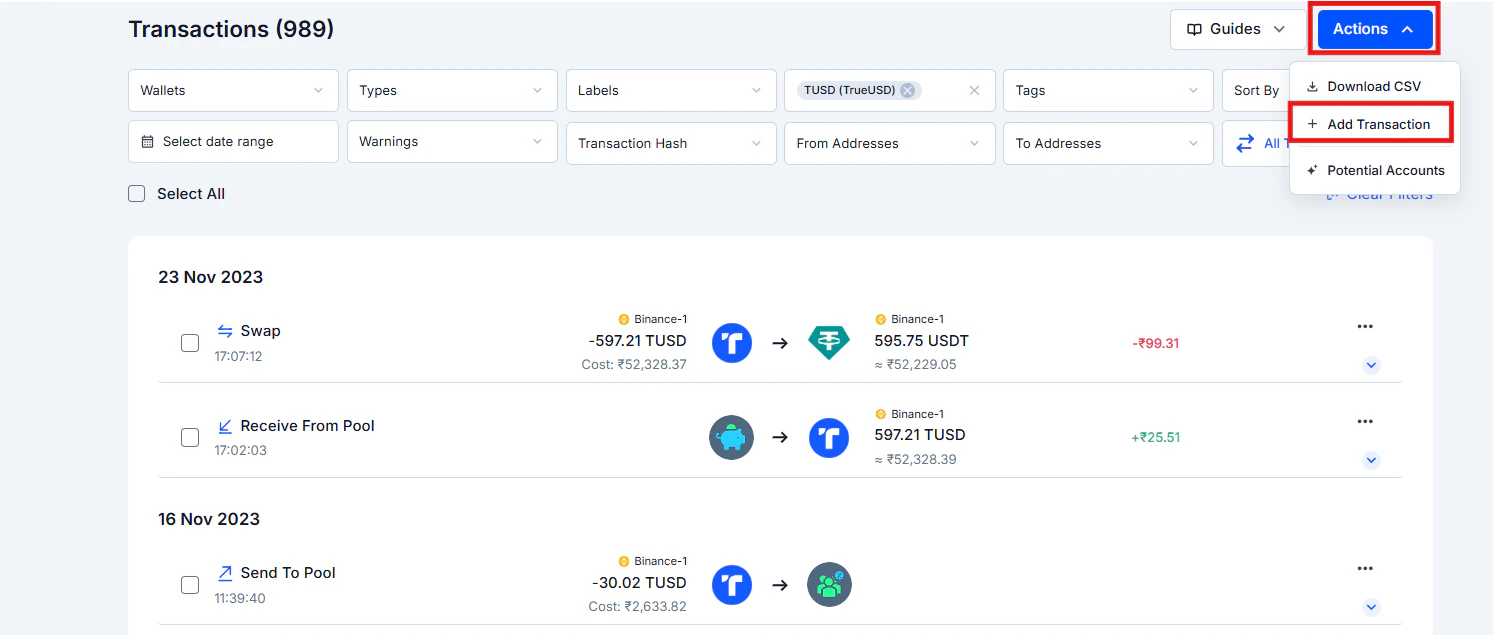
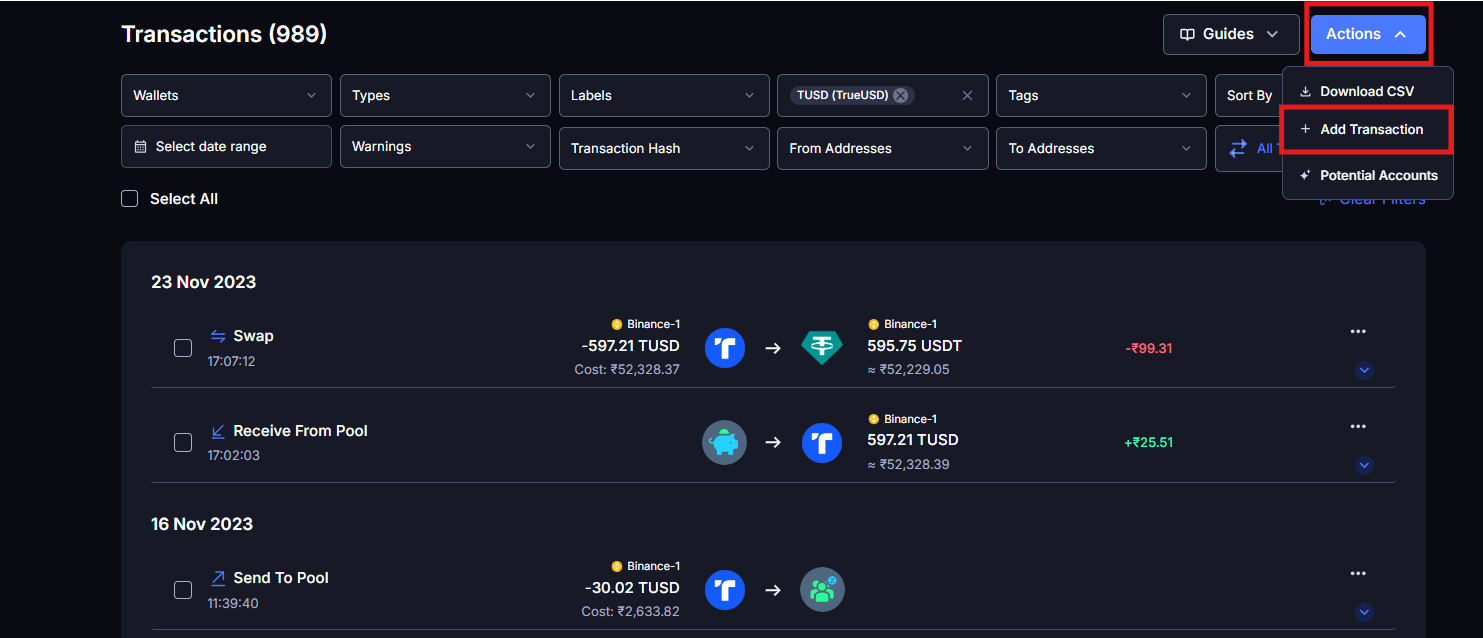
Go to Transactions in the left sidebar

2

Click the Actions button in the top right corner of the page

3

Select Add Transaction from the dropdown menu
Screenshot 2026 03 06 195745 2
4

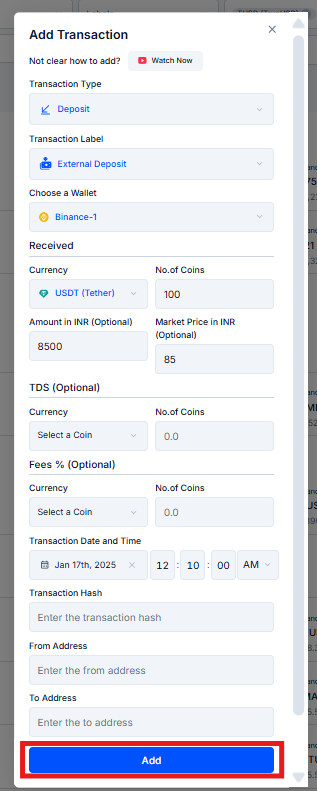
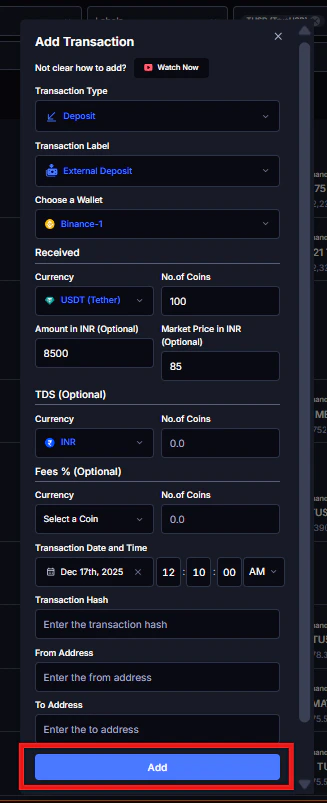
Fill in the required fields

  • Date and time
  • Transaction type (Deposit, Withdrawal, Trade, Expense, Futures Trade, Margin Trade)
  • Currency (search for the coin by name or ticker)
  • Number of Coins
  • Market Price
  • Fee (if applicable)
  • Optional: Transaction Hash, From Address, To Address, Description
5

Assign a source

Select an existing connected integration or create a new wallet/source directly from the tab, type a custom name like “WazirX Old” or “P2P Trade 2021” and save it as a new wallet. This helps you identify where a transaction came from when reviewing your report later.
6

Click Save. The transaction appears in your list immediately
Screenshot 2026 03 06 200601 1
7

Check the category on the newly added transaction and look for any warnings

A manually added acquisition sometimes triggers a warning if there’s already a matching disposal in the system that it now needs to be linked to.

Manual Entry vs. Custom File Upload, Which to Use

Manual EntryCustom File Upload
Best for1–10 missing transactions, one-off events, gifts, P2PLarge batches, backfilling a full year, defunct exchanges
How to accessActions → Add TransactionIntegrations → Add Integration → Custom File
SpeedFast for a few entriesMuch faster for 50+ transactions
Format requiredEnter fields directlyDownload KoinX’s CSV template, fill it in, upload
When to use Custom File: If you’re importing a full year of trades from a closed exchange, or any situation where you have more than 10–15 transactions to add, the Custom File upload saves significant time. Go to Integrations → Add Integration → Custom File: there’s a Download Template button on that screen. Fill in your transactions using the template format and upload the file. KoinX imports everything at once.

Common Issues / Edge Cases

Search by the full coin name, not just the ticker, some newer or less common tokens may only appear under their full name. If the token genuinely isn’t in the database, you may need to contact KoinX support to have it added.
Use the closest available time. The date is more important than the exact hour for most tax purposes. If you have any record of the event (email, screenshot, bank statement), use whatever timestamp it shows.
Double-check that the transaction type is correct. A “Transfer” won’t generate a gain/loss. A “Deposit” creates a record but no gain. A “Trade” triggers a gain/loss calculation. If the type is wrong, the price being right won’t matter.
Make sure the dates are correct and the asset names match exactly. KoinX uses the acquisition records to calculate cost basis for future sales, if the asset name or date doesn’t align with what’s already in the system, the link might not form automatically.

Frequently Asked Questions

Don’t enter ₹0 as the cost basis and move on, that inflates your taxable gains to 100% of proceeds. Before giving up:
  • Log into the old exchange account, transaction history is sometimes still accessible even if trading is disabled
  • Check your email inbox for order confirmation receipts
  • Check your bank statements for fiat deposits that correspond to purchases
If records are genuinely unrecoverable, your CA can advise on the acceptable approach for your jurisdiction.
First, check whether the exchange published a data export option before closing. Some gave users a window to download their history. If you have any CSV, email receipts, or screenshots, use those as your source. Approximate prices based on historical market data (CoinGecko by date) are better than ₹0. If you’re estimating, document your reasoning.
This depends on whether the token is in KoinX’s database. If it’s not found when you search, try variations of the name. If it genuinely isn’t there, reach out to KoinX support.
The transaction is added to your history immediately. But your Tax Report needs to be regenerated to include the new data. After adding manual transactions, go to Tax Reports and generate a fresh report.
Last modified on March 13, 2026