
What Does This Mean?
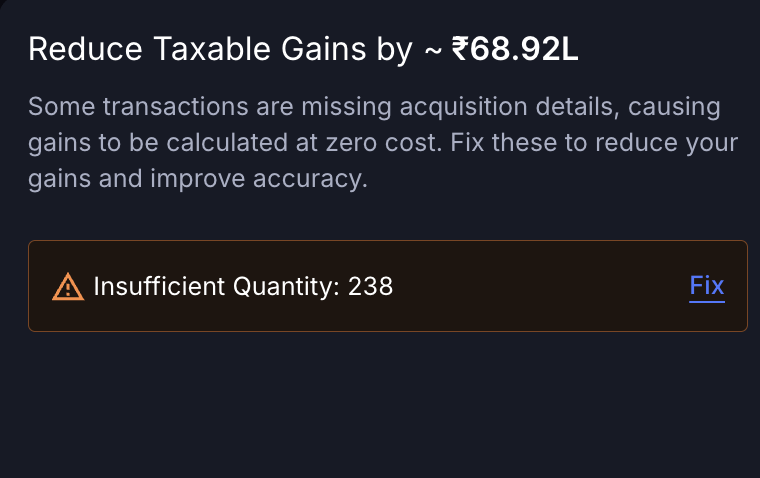
- Cost basis = 0
- Full sale value is treated as gain
- Your profits look inflated
KoinX can only calculate correct gains if it has complete acquisition history — buys, deposits, rewards, and transfers.
Where Can You Check This?
You can directly identify affected transactions from the Transactions page.1
Go to Transactions
Open the Transactions page from the sidebar.
2
Apply warning filter
Select: Warnings → “Can’t find purchase transactions”
3
Review affected entries
These are the exact transactions where KoinX is missing acquisition history.
Why This Matters
Crypto tax is calculated as: Sale Value – Cost of Acquisition = Gain If cost is missing: Gain = Full Sale Value Which means:- Gains are overstated
- Tax appears higher
- Your report may be incorrect
How “Reduce Taxable Gains” is Calculated
The number shown in Insights is not exact — it’s an estimate. Reduce Taxable Gains = 50% of gains linked to missing purchase history Why 50%? Because KoinX does not know the actual purchase price yet. Instead of guessing, it shows a safe estimate of how much your gains could reduce once the missing data is fixed.This is a directional estimate — your actual gains may reduce more or less depending on the real cost basis.
Example
Let’s say:- You sold crypto for ₹10,000
- But purchase history is missing
Important: Reports vs Insights
- Reports: Use current data → missing cost = higher gains
- Insights: Show potential correction → estimated reduction
Insights = how much you can fix
How to Fix This
You don’t need to manually adjust anything — just fix the missing data.Please follow the steps mentioned here- My cost basis is showing ₹0 — what’s happening?** **to fix it.
Frequently Asked Questions
Is Reduce Taxable Gains an exact number?
Is Reduce Taxable Gains an exact number?
No. It’s an estimate based on 50% of gains linked to missing acquisition history. The actual reduction depends on your real purchase price.
Will my report update after fixing this?
Will my report update after fixing this?
Yes. Once you add the missing data, regenerate your report to see the corrected gains.
Will this happen if I import only one financial year?
Will this happen if I import only one financial year?
Yes. If the asset was bought in an earlier year, KoinX won’t have the cost basis unless that data is also imported.
Can transfers cause this issue?
Can transfers cause this issue?
Yes. Missing deposits or transfer-ins are a very common reason for insufficient quantity errors.
Can I ignore this warning?
Can I ignore this warning?
No. You should not, as it will effect your tax amount.