
Why Percentages?
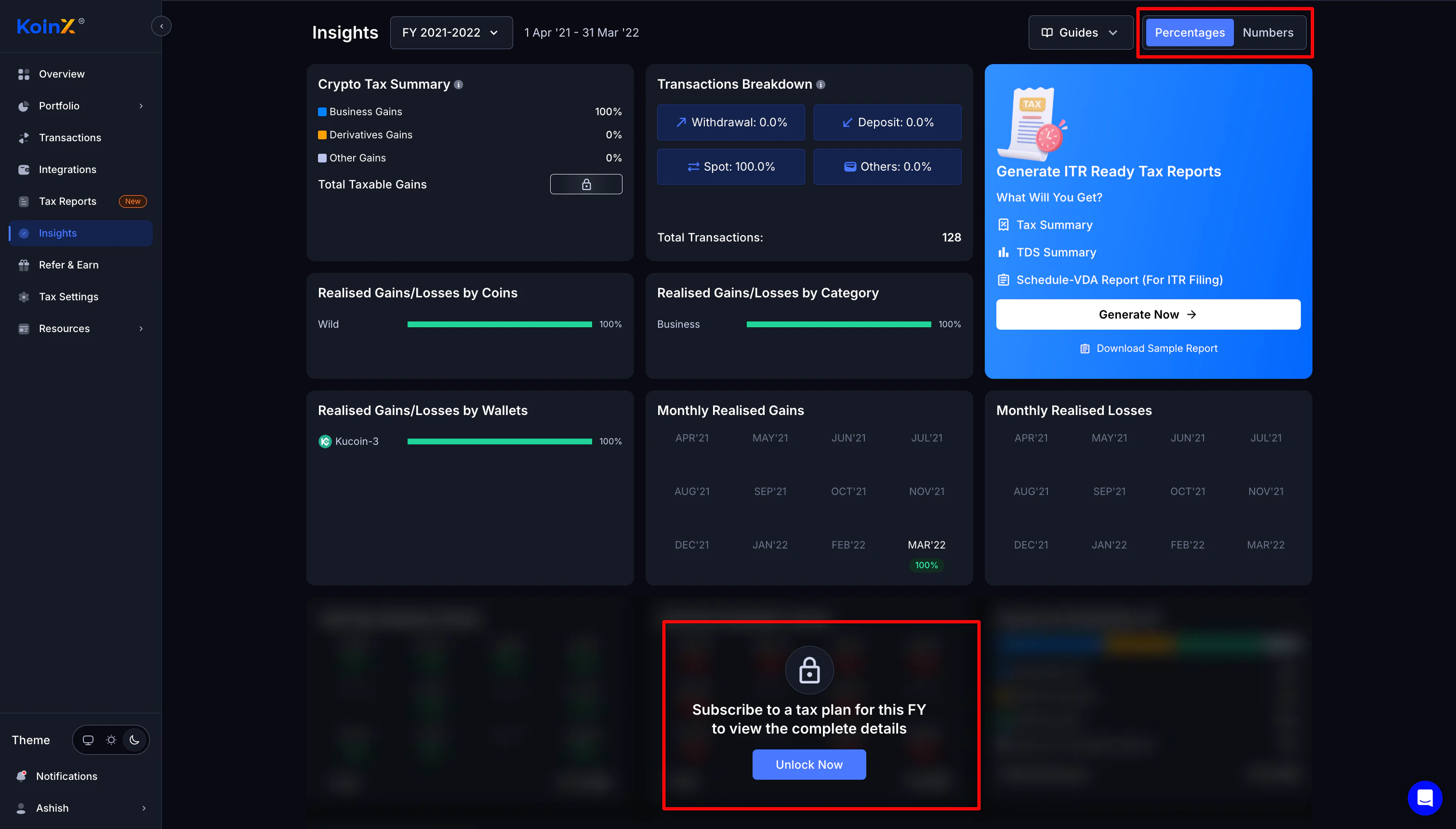
KoinX shows data in percentage format by default on the Insights page. This gives every user — including free users — a proportional view of their tax situation without requiring a plan.What you can see for free
- Percentage breakdown of gains vs. losses
- Relative distribution by coin
- Proportional view of income types
- Comparative breakdown by category
What requires a plan
- Exact numerical values in fiat
- Downloadable tax reports
- TDS summary with actual figures (if applicable)
-1.png?fit=max&auto=format&n=i_0FLR3BPkRKmu_n&q=85&s=134ee0a9d6e3030fda64e4dd97244043 "Image(1) 1")
How to View Numbers Instead of Percentages
Already on a paid plan? Switching to number view takes about three seconds.1
Go to the Insights page
Find Insights in the left sidebar and click it.
2
Find the toggle at the top right
Look for the Numbers / Percentages toggle in the upper right corner of the page.
3
Click Numbers
Hit Numbers and every value on the page switches from percentages to actual fiat amounts. Done.
-1.png?fit=max&auto=format&n=i_0FLR3BPkRKmu_n&q=85&s=85845efda666c1e258b28cb28d728f61 "Image(1) 2")
-2.png?fit=max&auto=format&n=i_0FLR3BPkRKmu_n&q=85&s=e17bffb4eb78e161119f13429a3994cd "Image(1) 2")
The toggle only appears — and only works — if you have an active plan for the financial year you’re currently viewing. If you can’t see it, check your FY selector first.
I Purchased a Plan but Values Are Still Locked
Paid but still seeing percentages? Run through these checks before contacting support.Check 1 — Is the correct financial year selected?
Check 1 — Is the correct financial year selected?
Plans are FY-specific. If you purchased for FY 2024-25 but you’re viewing FY 2023-24, those values will still be locked.Fix: Look at the FY selector at the top of the page and make sure it matches the year you paid for.
Check 2 — Did the payment go through?
Check 2 — Did the payment go through?
- Check your email for a payment confirmation from KoinX
- Check your bank statement for the debit
- Go to Billing & Invoices to verify your active plan
Check 3 — Try a hard refresh
Check 3 — Try a hard refresh
Sometimes the unlock takes a moment to reflect on the UI. Try:
- Hard refresh: Ctrl+Shift+R (Windows) or Cmd+Shift+R (Mac)
- Log out and log back in
- Clear your browser cache
Check 4 — Still locked? Contact support
Check 4 — Still locked? Contact support
If everything above checks out and values are still locked, reach out to KoinX support:
- Have your transaction ID or payment confirmation ready
- Attach a screenshot showing the locked state
- The team can verify and manually unlock if there’s a system issue on the backend
What the Insights Page Actually Shows You
Here’s a breakdown of every section on the Insights page and what it contains..png?fit=max&auto=format&n=i_0FLR3BPkRKmu_n&q=85&s=140c178f28f4f9d2602ddfed5a943cc3 "Image(5)")
.png?fit=max&auto=format&n=i_0FLR3BPkRKmu_n&q=85&s=7da68ac1b61fcdf8fc070c6346b95c5a "Image(5)")
- Crypto Tax Summary
- Transactions Breakdown
- Realised Gains / Losses
- TDS Summary (India only)
Shows the breakdown of your taxable events for the selected FY:
- Capital Gains %
- Derivatives Gains %
- Other Gains %
- Total Taxable Gains — locked until plan purchase
Older FY Visible but Locked?
If you see an older financial year in the dropdown but the data is locked, here’s what’s happening.Free vs. Paid: Full Comparison
Frequently Asked Questions
Percentages are visible but values are locked — why?
Percentages are visible but values are locked — why?
Percentages are free for everyone. Actual fiat values require a paid plan for that financial year. Make sure the FY selector matches the year you’ve paid for.
I purchased a plan but values are still locked — what do I do?
I purchased a plan but values are still locked — what do I do?
Run through these checks in order:
- Are you viewing the correct FY? Plans are year-specific.
- Is payment still processing? Wait a few minutes.
- Browser cache issue? Hard refresh or log out and back in.
How do I switch from percentages to numbers?
How do I switch from percentages to numbers?
Once you have an active plan:
- Go to the Insights page
- Find the Numbers / Percentages toggle at the top right
- Click Numbers
Does a plan unlock Insights for all financial years?
Does a plan unlock Insights for all financial years?
No. Plans are FY-specific. Purchasing a plan unlocks numerical insights and reports only for that financial year. You’ll need a separate plan for each other year you want to unlock.
Does unlocking Insights require payment?
Does unlocking Insights require payment?
Percentage-based insights are free. Exact numerical values, downloadable reports, and TDS figures all require purchasing a plan for the relevant financial year.
What’s Next?
Now that you know what you’re looking at, here’s where most users head next:Plans & Pricing
Understand what each plan includes and which FY you’re buying for.
Generate Your Tax Report
Once your Insights look right, this is where you turn them into a CA-ready report.
Fixing Insufficient Quantity
Data issues can affect your insights. Fix them before generating your report.
Tax Reports Overview
A full breakdown of every report KoinX generates after purchase.