
AI Summary
- Shows your crypto holdings at the start of the financial year (e.g., April 1 for India)
- Includes all coins and tokens across all connected wallets and exchanges
- Shows quantities and fair market value on the opening date
- Essential for CAs and accountants who need opening balances for accounting
- If your opening balance looks wrong, the fix is in your historical transaction data, not in the report itself
- Works as a companion to the End of Year Balance Report
What Does This Report Show?
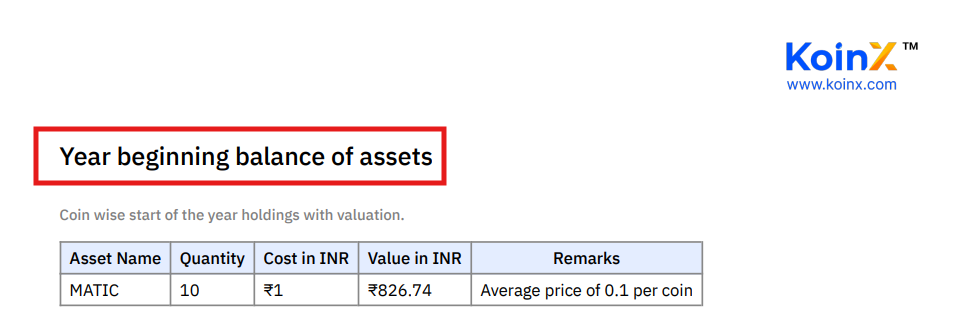
Example for India (FY 2025-26): The report shows holdings as of April 1, 2025, 00:00:00 IST. If you held 0.5 BTC and 10 ETH at that moment, they appear with their April 1 prices.
How Does KoinX Calculate This?
KoinX does not guess your opening balance. It calculates it from your complete transaction history:- Takes all transactions before the start of the financial year
- Runs a ledger: buys add to balance, sells subtract from balance
- Arrives at what you held on the first day of the year
Who Needs This Report?
Your CA or accountant for preparing financial statements, reconciling crypto holdings with other assets, and audit and compliance documentation. Schedule FA filers (India) who hold foreign assets, including crypto on international exchanges, may need to report opening balances. Personal records for tracking portfolio growth year-over-year.Beginning of Year vs End of Year Balance
These two reports work as a pair.
Together they show how your portfolio changed over the year. Your CA may request both.
What If My Opening Balance Looks Wrong?
Shows coins I don't recognise
Shows coins I don't recognise
These could be airdropped tokens, DeFi interaction remnants, dust from old trades, or tokens that were rebranded. Check your Transaction History for deposits of these tokens. You may have actually received them and forgotten.
Shows zero when I know I held crypto
Shows zero when I know I held crypto
Your transactions from before the financial year are likely missing. Check your Integrations to see whether historical data was imported. Some exchange APIs have lookback limits, so use CSV upload for older data that the API cannot retrieve.
Shows higher quantity than expected
Shows higher quantity than expected
You may have deposits or income (staking rewards, airdrops) that you forgot about. Check for wallet transfers that may have been double-counted. Review the Transaction History for the period before the financial year.
The Importance of Past-Year Data
Your opening balance for FY 2025-26 depends on all your transactions from previous years. FY 2024-25 transactions affect your April 1, 2025 opening balance. FY 2023-24 transactions affect your April 1, 2024 opening balance. And so on. If you only import current-year transactions, KoinX assumes you started the year with zero holdings. Best practice: Import your complete trading history when setting up KoinX, even if you only need reports for the current year.Valuation: Which Price Is Used?
KoinX values holdings at fair market value on the first day of the financial year:- Major coins (BTC, ETH, etc.): Price at 00:00:00 of the start date
- Smaller tokens: Best available price from supported price sources
- Tokens without price data: May show as Rs. 0 value (quantity is still shown)
Frequently Asked Questions
Why does my Beginning of Year balance show coins I don't recognise?
Why does my Beginning of Year balance show coins I don't recognise?
These could be airdropped tokens, DeFi remnants, dust from old trades, or rebranded tokens. Check your Transaction History for deposits of those tokens around or before the start of the financial year.
What if my Beginning of Year balance looks incorrect?
What if my Beginning of Year balance looks incorrect?
The balance is calculated from your transaction history. If it is wrong, some transactions are missing. Check whether you have imported all historical data, especially from before the financial year. Use CSV uploads for data beyond API lookback limits.
Does this report affect my tax calculations?
Does this report affect my tax calculations?
Yes, indirectly. Your opening balance reflects your cost basis pool. If it is wrong, your gain/loss calculations for the year may also be wrong. Fix the underlying transactions to correct the balance, then regenerate your tax reports.
Can I get this report for multiple financial years?
Can I get this report for multiple financial years?
Yes. Change the financial year in the dropdown and generate the report. Each year shows the balance as of that year’s start date.