
AI Summary
- This report shows all buy and sell transactions during the selected financial year
- Includes crypto purchases, crypto sales, and crypto-to-crypto swaps
- Does not include deposits, withdrawals, transfers, or income events
- Useful for reviewing trading activity and verifying imported trade data before generating tax reports
- Available to all users regardless of country setting
What Does This Report Contain?
Understanding Each Column
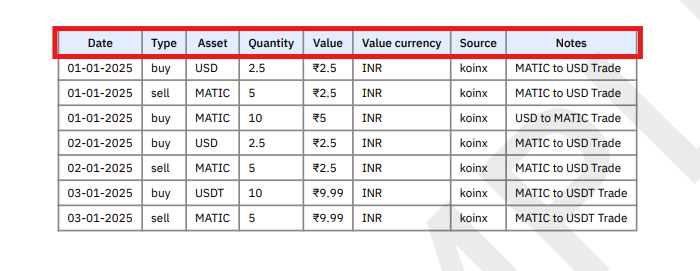
How Crypto Swaps Appear in the Report
Crypto-to-crypto swaps are recorded as two separate transactions in the Buy-Sell Report.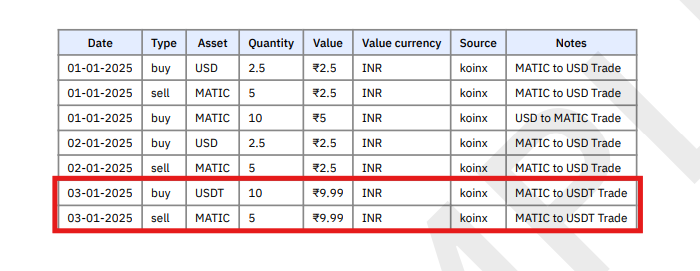
- Sell MATIC
- Buy USDT
Buy-Sell Report vs Transaction History Report
Use the Buy-Sell Report when you want to focus only on trades, without other transaction types getting in the way.
Using This Report for Verification
Before generating your tax reports, use the Buy-Sell Report to:- Review trading activity during the financial year
- Check whether all exchanges and wallets are included
- Verify large or unusual trades look correct
- Confirm that data imported from integrations or CSV files is accurate
Filtering the Report
The PDF version cannot be filtered directly. To sort or filter by date, asset, or source:- Download the report in Excel format
- Use spreadsheet filters to find specific trades
- Alternatively, use the Transactions page in KoinX to filter before generating the report
Frequently Asked Questions
Does this report include deposits or withdrawals?
Does this report include deposits or withdrawals?
No. The Buy-Sell Report only includes transactions related to trading activity: buys, sells, and swaps. For a complete record including deposits and withdrawals, use the Transaction History Report.
Why do I see two transactions for one swap?
Why do I see two transactions for one swap?
Crypto-to-crypto trades are recorded as two entries: one sell transaction and one buy transaction. This ensures both sides of the trade are properly captured for cost basis and gain/loss calculations.
Does this report include transactions from all my exchanges?
Does this report include transactions from all my exchanges?
Yes. All connected exchanges, wallets, and uploaded files that contain buy and sell transactions appear in this report, consolidated into a single list.
Is this report used for tax calculation?
Is this report used for tax calculation?
This report shows your trading records, not the final tax calculations. Tax calculations appear in the Complete Tax Report and Capital Gains summaries. Use the Buy-Sell Report for reviewing and verifying your trade data.
Can I sort the data in this report?
Can I sort the data in this report?
The PDF version cannot be filtered, but you can download the Excel version and sort or filter by asset, date, or exchange using standard spreadsheet tools.